<?xml version="1.0" encoding="utf-8"?><feed xmlns="http://www.w3.org/2005/Atom" ><generator uri="https://jekyllrb.com/" version="3.10.0">Jekyll</generator><link href="https://andyluo7.github.io/feed.xml" rel="self" type="application/atom+xml" /><link href="https://andyluo7.github.io/" rel="alternate" type="text/html" /><updated>2026-05-15T00:22:28+00:00</updated><id>https://andyluo7.github.io/feed.xml</id><title type="html">Andy Luo — Notes &amp;amp; Projects</title><subtitle>Writing about software engineering, side projects, and lessons learned along the way.</subtitle><entry><title type="html">CPU-GPU Co-Design for Agentic LLM Inference</title><link href="https://andyluo7.github.io/llm/amd/mi300x/vllm/lmcache/performance/2026/05/14/cpu-gpu-codesign-agentic-inference-mi300x/" rel="alternate" type="text/html" title="CPU-GPU Co-Design for Agentic LLM Inference" /><published>2026-05-14T00:00:00+00:00</published><updated>2026-05-14T00:00:00+00:00</updated><id>https://andyluo7.github.io/llm/amd/mi300x/vllm/lmcache/performance/2026/05/14/cpu-gpu-codesign-agentic-inference-mi300x</id><content type="html" xml:base="https://andyluo7.github.io/llm/amd/mi300x/vllm/lmcache/performance/2026/05/14/cpu-gpu-codesign-agentic-inference-mi300x/"><![CDATA[<p><em>Quantifying where time actually goes — and why your CPU might be stealing 15% and more of your GPU throughput.</em></p>

<hr />

<h2 id="key-summary">Key Summary</h2>

<p>We instrumented the full request lifecycle of agentic LLM inference on AMD MI300X to answer a simple question: <strong>how much of end-to-end latency is CPU work vs GPU work?</strong></p>

<p>Using MiniMax-M2.5 (230 GB FP8 MoE) on 2× MI300X with vLLM 0.19.0, we decomposed every request into serialization, HTTP overhead (tokenization + scheduling + queue wait), GPU prefill, and GPU decode across 8 scenarios spanning concurrency 1–32 and context 1k–100k tokens.</p>

<p><strong>Headline findings:</strong></p>
<ul>
  <li><strong>At low concurrency, CPU overhead is negligible</strong> — 0.4–0.6% of E2E time for single requests at any context length</li>
  <li><strong>At high concurrency, CPU overhead becomes material</strong> — 11–15% of E2E time at 32 concurrent users</li>
  <li><strong>The bottleneck is not tokenization or JSON parsing</strong> — it’s <strong>scheduling + queue wait</strong>, which scales superlinearly with concurrency</li>
  <li><strong>Tokenization at 100k tokens costs only 220ms</strong> (~500k tok/s on a single CPU core), tiny compared to GPU prefill (2–4 seconds)</li>
  <li><strong>LMCache adds minimal CPU overhead</strong> vs HBM prefix cache — the CPU% split is nearly identical between the two strategies</li>
  <li><strong>The real CPU-GPU co-design opportunity</strong> is not in making CPU faster, but in <strong>overlapping CPU work with GPU work</strong> and reducing scheduling contention at high concurrency</li>
</ul>

<hr />

<h2 id="1-motivation-the-hidden-cpu-tax-in-agentic-inference">1. Motivation: The Hidden CPU Tax in Agentic Inference</h2>

<p>Our previous work benchmarked <a href="https://github.com/andyluo7/openclaw-workspace/tree/main/multiturn-agentic-bench">LMCache for multi-turn agentic workloads on MI300X</a>, comparing KV-cache strategies. We measured TTFT, throughput, and cache hit rates. But we treated the inference server as a black box — we never asked <em>where inside the server</em> the time goes.</p>

<p>Agentic AI workloads are not just GPU workloads. Every request passes through a CPU pipeline before and after GPU execution:</p>

<div class="language-plaintext highlighter-rouge"><div class="highlight"><pre class="highlight"><code>Client                          Server (vLLM)                      GPU
──────                          ─────────────                      ───
 │                                    │                              │
 │─── serialize request ──────────────│                              │
 │    (JSON, 0.04-1.3ms)              │                              │
 │                                    │                              │
 │                          ┌─────────┴──────────┐                   │
 │                          │ HTTP parse         │                   │
 │                          │ Tokenize input     │                   │
 │                          │ Schedule request   │  "HTTP Overhead"  │
 │                          │ KV cache lookup    │  (7-3900ms)       │
 │                          │ Queue wait         │                   │
 │                          └─────────┬──────────┘                   │
 │                                    │                              │
 │                                    │──── GPU prefill ─────────────│
 │                                    │     (41-28537ms)             │
 │                                    │                              │
 │                                    │──── GPU decode (streaming) ──│
 │                                    │     (1780-20792ms)           │
 │                                    │                              │
 │◄── parse SSE response ─────────────│                              │
 │    (1.9µs per chunk)               │                              │
</code></pre></div></div>

<p>The question: at scale (32 concurrent users, 100k token contexts), does the CPU pipeline become a bottleneck?</p>

<hr />

<h2 id="2-methodology">2. Methodology</h2>

<h3 id="21-hardware--software">2.1 Hardware &amp; Software</h3>

<table>
  <thead>
    <tr>
      <th>Component</th>
      <th>Specification</th>
    </tr>
  </thead>
  <tbody>
    <tr>
      <td>GPU</td>
      <td>2× AMD Instinct MI300X (192 GB HBM3 each), gfx942</td>
    </tr>
    <tr>
      <td>CPU</td>
      <td>AMD EPYC (ENC1-CLS01-SVR08)</td>
    </tr>
    <tr>
      <td>Model</td>
      <td>MiniMaxAI/MiniMax-M2.5 FP8, TP=2</td>
    </tr>
    <tr>
      <td>Framework</td>
      <td>vLLM 0.19.0 (ROCm)</td>
    </tr>
    <tr>
      <td>KV Cache</td>
      <td>HBM prefix cache / LMCache CPU DRAM</td>
    </tr>
    <tr>
      <td>Workload</td>
      <td>739 anonymized Claude Code agentic conversations</td>
    </tr>
  </tbody>
</table>

<h3 id="22-what-we-measured">2.2 What We Measured</h3>

<p>We decomposed each request into five time components:</p>

<table>
  <thead>
    <tr>
      <th>Component</th>
      <th>Where</th>
      <th>What It Captures</th>
    </tr>
  </thead>
  <tbody>
    <tr>
      <td><strong>t_serialize</strong></td>
      <td>Client CPU</td>
      <td>JSON serialization of the request payload</td>
    </tr>
    <tr>
      <td><strong>t_http_overhead</strong></td>
      <td>Server CPU</td>
      <td>HTTP parsing + tokenization + scheduling + queue wait + KV cache lookup</td>
    </tr>
    <tr>
      <td><strong>t_server_prefill</strong></td>
      <td>Server GPU</td>
      <td>Attention computation over all input tokens</td>
    </tr>
    <tr>
      <td><strong>t_decode</strong></td>
      <td>Server GPU (mostly)</td>
      <td>Autoregressive token generation + streaming</td>
    </tr>
    <tr>
      <td><strong>t_response_parse</strong></td>
      <td>Client CPU</td>
      <td>SSE chunk parsing + tool call extraction</td>
    </tr>
  </tbody>
</table>

<p>We classify <code class="language-plaintext highlighter-rouge">t_serialize + t_http_overhead + t_response_parse</code> as <strong>CPU time</strong> and <code class="language-plaintext highlighter-rouge">t_server_prefill + t_decode</code> as <strong>GPU time</strong>.</p>

<p><strong>Note:</strong> <code class="language-plaintext highlighter-rouge">t_http_overhead</code> is measured as the gap between client sending the HTTP request and receiving the first byte back. This includes tokenization, scheduling, queue wait time, and KV cache management — all CPU-side work that happens before the GPU begins prefill. At low concurrency this is mostly tokenization + scheduling. At high concurrency, queue wait dominates.</p>

<h3 id="23-test-matrix">2.3 Test Matrix</h3>

<table>
  <thead>
    <tr>
      <th>Scenario</th>
      <th>Concurrency</th>
      <th>Context</th>
      <th>Purpose</th>
    </tr>
  </thead>
  <tbody>
    <tr>
      <td>single_1k</td>
      <td>1</td>
      <td>1,000</td>
      <td>Baseline: pure overhead</td>
    </tr>
    <tr>
      <td>single_8k</td>
      <td>1</td>
      <td>8,000</td>
      <td>Typical agent turn</td>
    </tr>
    <tr>
      <td>single_32k</td>
      <td>1</td>
      <td>32,000</td>
      <td>Large agent context</td>
    </tr>
    <tr>
      <td>single_100k</td>
      <td>1</td>
      <td>100,000</td>
      <td>Maximum agent context</td>
    </tr>
    <tr>
      <td>conc4_8k</td>
      <td>4</td>
      <td>8,000</td>
      <td>Light multi-tenant</td>
    </tr>
    <tr>
      <td>conc16_32k</td>
      <td>16</td>
      <td>32,000</td>
      <td>Medium load</td>
    </tr>
    <tr>
      <td>conc32_32k</td>
      <td>32</td>
      <td>32,000</td>
      <td>High load, moderate context</td>
    </tr>
    <tr>
      <td>conc32_100k</td>
      <td>32</td>
      <td>100,000</td>
      <td>Stress: high load + large context</td>
    </tr>
  </tbody>
</table>

<p>Each scenario was run with 3–5 batches of requests, with results aggregated.</p>

<hr />

<h2 id="3-results">3. Results</h2>

<h3 id="31-the-cpu-gpu-split-its-all-about-concurrency">3.1 The CPU-GPU Split: It’s All About Concurrency</h3>

<p><strong>HBM Prefix Cache Configuration:</strong></p>

<table>
  <thead>
    <tr>
      <th>Scenario</th>
      <th>Conc</th>
      <th>Ctx</th>
      <th>HTTP OH (ms)</th>
      <th>Prefill (ms)</th>
      <th>Decode (ms)</th>
      <th>Total (ms)</th>
      <th><strong>CPU%</strong></th>
      <th><strong>GPU%</strong></th>
    </tr>
  </thead>
  <tbody>
    <tr>
      <td>single_1k</td>
      <td>1</td>
      <td>1K</td>
      <td>7</td>
      <td>41</td>
      <td>1,780</td>
      <td>1,828</td>
      <td><strong>0.4%</strong></td>
      <td>99.6%</td>
    </tr>
    <tr>
      <td>single_8k</td>
      <td>1</td>
      <td>8K</td>
      <td>15</td>
      <td>124</td>
      <td>3,142</td>
      <td>3,282</td>
      <td><strong>0.5%</strong></td>
      <td>99.5%</td>
    </tr>
    <tr>
      <td>single_32k</td>
      <td>1</td>
      <td>32K</td>
      <td>47</td>
      <td>682</td>
      <td>7,736</td>
      <td>8,465</td>
      <td><strong>0.6%</strong></td>
      <td>99.4%</td>
    </tr>
    <tr>
      <td>single_100k</td>
      <td>1</td>
      <td>100K</td>
      <td>131</td>
      <td>3,555</td>
      <td>20,792</td>
      <td>24,479</td>
      <td><strong>0.6%</strong></td>
      <td>99.4%</td>
    </tr>
    <tr>
      <td>conc4_8k</td>
      <td>4</td>
      <td>8K</td>
      <td>53</td>
      <td>137</td>
      <td>3,101</td>
      <td>3,291</td>
      <td><strong>1.6%</strong></td>
      <td>98.4%</td>
    </tr>
    <tr>
      <td>conc16_32k</td>
      <td>16</td>
      <td>32K</td>
      <td>555</td>
      <td>498</td>
      <td>7,832</td>
      <td>8,885</td>
      <td><strong>6.2%</strong></td>
      <td>93.8%</td>
    </tr>
    <tr>
      <td>conc32_32k</td>
      <td>32</td>
      <td>32K</td>
      <td>1,130</td>
      <td>636</td>
      <td>7,873</td>
      <td>9,639</td>
      <td><strong>11.6%</strong></td>
      <td>88.4%</td>
    </tr>
    <tr>
      <td>conc32_100k</td>
      <td>32</td>
      <td>100K</td>
      <td>3,885</td>
      <td>2,479</td>
      <td>19,591</td>
      <td>25,957</td>
      <td><strong>14.9%</strong></td>
      <td>85.1%</td>
    </tr>
  </tbody>
</table>

<p>The pattern is clear: <strong>CPU overhead scales with concurrency, not context length.</strong></p>

<ul>
  <li>Single-request: CPU% is flat at ~0.5% regardless of whether context is 1k or 100k</li>
  <li>At concurrency 32: CPU% jumps to 11–15%</li>
  <li>The dominant CPU cost is <code class="language-plaintext highlighter-rouge">t_http_overhead</code> (scheduling + queue wait), not tokenization</li>
</ul>

<h3 id="32-lmcache-vs-hbm-prefix-cache-cpu-overhead-comparison">3.2 LMCache vs HBM Prefix Cache: CPU Overhead Comparison</h3>

<p><strong>LMCache DRAM Configuration (gpu-mem-util=0.78):</strong></p>

<table>
  <thead>
    <tr>
      <th>Scenario</th>
      <th>Conc</th>
      <th>Ctx</th>
      <th>HTTP OH (ms)</th>
      <th>Prefill (ms)</th>
      <th>Decode (ms)</th>
      <th>Total (ms)</th>
      <th><strong>CPU%</strong></th>
      <th><strong>GPU%</strong></th>
    </tr>
  </thead>
  <tbody>
    <tr>
      <td>single_1k</td>
      <td>1</td>
      <td>1K</td>
      <td>7</td>
      <td>44</td>
      <td>2,653</td>
      <td>2,704</td>
      <td><strong>0.3%</strong></td>
      <td>99.7%</td>
    </tr>
    <tr>
      <td>single_8k</td>
      <td>1</td>
      <td>8K</td>
      <td>15</td>
      <td>178</td>
      <td>3,376</td>
      <td>3,569</td>
      <td><strong>0.4%</strong></td>
      <td>99.6%</td>
    </tr>
    <tr>
      <td>conc4_8k</td>
      <td>4</td>
      <td>8K</td>
      <td>50</td>
      <td>121</td>
      <td>3,455</td>
      <td>3,627</td>
      <td><strong>1.4%</strong></td>
      <td>98.6%</td>
    </tr>
    <tr>
      <td>conc16_32k</td>
      <td>16</td>
      <td>32K</td>
      <td>515</td>
      <td>1,655</td>
      <td>8,063</td>
      <td>10,233</td>
      <td><strong>5.1%</strong></td>
      <td>94.9%</td>
    </tr>
    <tr>
      <td>conc32_32k</td>
      <td>32</td>
      <td>32K</td>
      <td>1,135</td>
      <td>722</td>
      <td>8,386</td>
      <td>10,243</td>
      <td><strong>11.0%</strong></td>
      <td>89.0%</td>
    </tr>
    <tr>
      <td>conc32_100k</td>
      <td>32</td>
      <td>100K</td>
      <td>3,937</td>
      <td>28,537</td>
      <td>20,769</td>
      <td>53,244</td>
      <td><strong>9.8%</strong></td>
      <td>90.2%</td>
    </tr>
  </tbody>
</table>

<p><strong>Key comparison — CPU overhead is nearly identical:</strong></p>

<table>
  <thead>
    <tr>
      <th>Scenario</th>
      <th>HBM-PC CPU%</th>
      <th>LMCache CPU%</th>
      <th>Delta</th>
    </tr>
  </thead>
  <tbody>
    <tr>
      <td>single_1k</td>
      <td>0.4%</td>
      <td>0.3%</td>
      <td>−0.1%</td>
    </tr>
    <tr>
      <td>conc4_8k</td>
      <td>1.6%</td>
      <td>1.4%</td>
      <td>−0.2%</td>
    </tr>
    <tr>
      <td>conc16_32k</td>
      <td>6.2%</td>
      <td>5.1%</td>
      <td>−1.1%</td>
    </tr>
    <tr>
      <td>conc32_32k</td>
      <td>11.6%</td>
      <td>11.0%</td>
      <td>−0.6%</td>
    </tr>
    <tr>
      <td>conc32_100k</td>
      <td>14.9%</td>
      <td>9.8%</td>
      <td>−5.1%</td>
    </tr>
  </tbody>
</table>

<p><strong>LMCache does NOT add measurable CPU overhead.</strong> In fact, CPU% is slightly <em>lower</em> with LMCache at high concurrency because LMCache’s CPU DRAM cache reduces HBM pressure, meaning less time in KV block eviction decisions on the CPU side.</p>

<p>The <code class="language-plaintext highlighter-rouge">t_http_overhead</code> is nearly identical between the two configs (~1,130–1,135ms at conc32_32k), confirming that the LMCache connector’s CPU-side work (hash computation, cache lookup, DMA scheduling) is negligible.</p>

<h3 id="33-where-does-cpu-time-actually-go">3.3 Where Does CPU Time Actually Go?</h3>

<p>We ran standalone micro-benchmarks to isolate each CPU component:</p>

<table>
  <thead>
    <tr>
      <th>Component</th>
      <th>Time at 100K tokens</th>
      <th>% of HTTP Overhead (conc=32)</th>
    </tr>
  </thead>
  <tbody>
    <tr>
      <td>Tokenization (encode)</td>
      <td>220 ms</td>
      <td>~5.7%</td>
    </tr>
    <tr>
      <td>JSON serialization (request build)</td>
      <td>0.82 ms</td>
      <td>&lt;0.1%</td>
    </tr>
    <tr>
      <td>SHA256 hash (cache key)</td>
      <td>0.62 ms</td>
      <td>&lt;0.1%</td>
    </tr>
    <tr>
      <td>SSE chunk parse (per token)</td>
      <td>1.9 µs</td>
      <td>&lt;0.1%</td>
    </tr>
    <tr>
      <td>Detokenization (128 tokens)</td>
      <td>0.27 ms</td>
      <td>&lt;0.1%</td>
    </tr>
    <tr>
      <td><strong>Scheduling + queue wait</strong></td>
      <td><strong>~3,660 ms</strong></td>
      <td><strong>~94%</strong></td>
    </tr>
  </tbody>
</table>

<p>The smoking gun: <strong>scheduling + queue wait accounts for ~94% of CPU overhead</strong> at high concurrency. Tokenization, hashing, and serialization are negligible.</p>

<p>This makes sense: at 32 concurrent requests, the vLLM scheduler must:</p>
<ol>
  <li>Decide which requests to batch together</li>
  <li>Walk the prefix cache tree to find matching blocks</li>
  <li>Allocate KV blocks for new tokens</li>
  <li>Manage the preemption queue when HBM is under pressure</li>
  <li>Coordinate across TP workers</li>
</ol>

<p>Each of these is O(n) or worse in the number of concurrent requests, and they all happen on a single Python thread (GIL-bound).</p>

<h3 id="34-tokenization-deep-dive-linear-but-fast">3.4 Tokenization Deep-Dive: Linear but Fast</h3>

<table>
  <thead>
    <tr>
      <th>Tokens</th>
      <th>Encode (ms)</th>
      <th>Throughput (tok/s)</th>
    </tr>
  </thead>
  <tbody>
    <tr>
      <td>679</td>
      <td>1.18</td>
      <td>576,506</td>
    </tr>
    <tr>
      <td>2,711</td>
      <td>5.09</td>
      <td>532,379</td>
    </tr>
    <tr>
      <td>5,423</td>
      <td>10.35</td>
      <td>523,861</td>
    </tr>
    <tr>
      <td>10,840</td>
      <td>20.46</td>
      <td>529,718</td>
    </tr>
    <tr>
      <td>21,679</td>
      <td>42.72</td>
      <td>507,414</td>
    </tr>
    <tr>
      <td>43,359</td>
      <td>87.85</td>
      <td>493,582</td>
    </tr>
    <tr>
      <td>67,745</td>
      <td>134.90</td>
      <td>502,188</td>
    </tr>
    <tr>
      <td>101,615</td>
      <td>220.38</td>
      <td>461,085</td>
    </tr>
  </tbody>
</table>

<p>Tokenization scales linearly with input length at ~500k tok/s. Even at 100k tokens (the largest agentic context we tested), tokenization takes only <strong>220ms</strong> — under 1% of E2E time for any scenario.</p>

<p>The HuggingFace <code class="language-plaintext highlighter-rouge">tokenizers</code> library (Rust-based BPE) is already highly optimized. Switching to a C++ tokenizer would save ~50–100ms at 100k tokens — not enough to matter.</p>

<p><strong>Detokenization</strong> (streaming output) is even faster: 0.27ms for 128 output tokens. Per-token streaming overhead is not a concern.</p>

<hr />

<h2 id="4-analysis-the-scheduling-wall">4. Analysis: The Scheduling Wall</h2>

<h3 id="41-why-scheduling-dominates-at-high-concurrency">4.1 Why Scheduling Dominates at High Concurrency</h3>

<p>The <code class="language-plaintext highlighter-rouge">t_http_overhead</code> captures everything from HTTP request receipt to first GPU kernel launch. At concurrency 1, it’s dominated by tokenization (~220ms for 100k). At concurrency 32, it balloons to <strong>3,885ms</strong> — a 30× increase.</p>

<p>The growth is <strong>superlinear</strong> with concurrency:</p>

<table>
  <thead>
    <tr>
      <th>Concurrency</th>
      <th>HTTP Overhead (32K ctx)</th>
      <th>Growth Factor</th>
    </tr>
  </thead>
  <tbody>
    <tr>
      <td>1</td>
      <td>47 ms</td>
      <td>1.0×</td>
    </tr>
    <tr>
      <td>4</td>
      <td>53 ms</td>
      <td>1.1×</td>
    </tr>
    <tr>
      <td>16</td>
      <td>555 ms</td>
      <td>11.8×</td>
    </tr>
    <tr>
      <td>32</td>
      <td>1,130 ms</td>
      <td>24.0×</td>
    </tr>
  </tbody>
</table>

<p>This superlinear scaling points to <strong>contention</strong> in the scheduling path:</p>

<ol>
  <li>
    <p><strong>Python GIL:</strong> vLLM’s scheduler runs in the main asyncio event loop. At 32 concurrent requests, the GIL serializes scheduling decisions, tokenization, and HTTP handling.</p>
  </li>
  <li>
    <p><strong>Prefix cache tree walks:</strong> With prefix caching enabled, every scheduling decision walks the block hash tree. At high concurrency with diverse prompts, the tree grows and walks become expensive.</p>
  </li>
  <li>
    <p><strong>Block allocation contention:</strong> The KV block allocator must coordinate free/used block tables across TP workers.</p>
  </li>
  <li>
    <p><strong>Queue wait:</strong> When the GPU is saturated, requests queue in the scheduler waiting for slots.</p>
  </li>
</ol>

<h3 id="42-the-15-rule">4.2 The 15% Rule</h3>

<p>Our data suggests a practical rule of thumb:</p>

<blockquote>
  <p><strong>At production-level concurrency (16–32 users), CPU overhead consumes 10–15% of E2E latency on MI300X.</strong></p>
</blockquote>

<p>This means that even with an infinitely fast GPU, you would only recover 85–90% of theoretical speedup. The remaining 10–15% is CPU-bound.</p>

<p>For a concrete example: at conc32_100k with HBM prefix cache, total E2E is 25,957ms. GPU time is 22,070ms (prefill + decode). Even if GPU time went to zero, the CPU overhead of 3,887ms would remain — setting a hard floor on latency.</p>

<hr />

<h2 id="5-optimization-recommendations">5. Optimization Recommendations</h2>

<h3 id="tier-1-high-impact-framework-level">Tier 1: High Impact, Framework-Level</h3>

<table>
  <thead>
    <tr>
      <th>Optimization</th>
      <th>Expected Impact</th>
      <th>Effort</th>
    </tr>
  </thead>
  <tbody>
    <tr>
      <td><strong>Pipeline scheduling with GPU execution</strong></td>
      <td>5–10% E2E at high concurrency</td>
      <td>Medium</td>
    </tr>
    <tr>
      <td><strong>Move tokenization off main event loop</strong></td>
      <td>2–3% at high concurrency</td>
      <td>Low</td>
    </tr>
    <tr>
      <td><strong>Batch scheduling decisions</strong></td>
      <td>3–5% at high concurrency</td>
      <td>Medium</td>
    </tr>
    <tr>
      <td><strong>Pre-allocate KV blocks speculatively</strong></td>
      <td>2–3% at high concurrency</td>
      <td>Medium</td>
    </tr>
  </tbody>
</table>

<h3 id="tier-2-system-level-tuning">Tier 2: System-Level Tuning</h3>

<table>
  <thead>
    <tr>
      <th>Optimization</th>
      <th>Expected Impact</th>
      <th>Effort</th>
    </tr>
  </thead>
  <tbody>
    <tr>
      <td><strong>NUMA affinity</strong> (pin workers to GPU-local node)</td>
      <td>1–2%</td>
      <td>Low</td>
    </tr>
    <tr>
      <td><strong>CPU frequency governor</strong> (<code class="language-plaintext highlighter-rouge">performance</code> mode)</td>
      <td>0.5–1%</td>
      <td>Trivial</td>
    </tr>
    <tr>
      <td><strong>Dedicated CPU cores for scheduler</strong> (isolcpus)</td>
      <td>1–2%</td>
      <td>Low</td>
    </tr>
  </tbody>
</table>

<h3 id="tier-3-not-worth-optimizing">Tier 3: Not Worth Optimizing</h3>

<table>
  <thead>
    <tr>
      <th>Component</th>
      <th>Why Not</th>
    </tr>
  </thead>
  <tbody>
    <tr>
      <td>Tokenizer speed</td>
      <td>Already 500k tok/s, &lt;1% of E2E</td>
    </tr>
    <tr>
      <td>JSON serialization</td>
      <td>&lt;1ms even at 100k tokens</td>
    </tr>
    <tr>
      <td>SSE parsing</td>
      <td>1.9µs per chunk — effectively zero</td>
    </tr>
    <tr>
      <td>LMCache hash/lookup</td>
      <td>&lt;1ms even at 100k tokens</td>
    </tr>
    <tr>
      <td>Detokenization</td>
      <td>0.27ms for 128 output tokens</td>
    </tr>
  </tbody>
</table>

<hr />

<h2 id="6-key-takeaways">6. Key Takeaways</h2>

<h3 id="for-inference-platform-teams">For inference platform teams:</h3>

<ol>
  <li>
    <p><strong>CPU overhead is real but bounded.</strong> At 32 concurrent users, 10–15% of E2E latency is CPU. This sets a floor on achievable latency regardless of GPU speed.</p>
  </li>
  <li>
    <p><strong>Scheduling is the bottleneck, not tokenization.</strong> Don’t waste time optimizing the tokenizer — optimize the scheduler and its interaction with the KV cache manager.</p>
  </li>
  <li>
    <p><strong>LMCache adds zero measurable CPU overhead.</strong> The cache connector’s hash/lookup/DMA scheduling cost is lost in the noise. If you’re avoiding LMCache because of CPU concerns, don’t.</p>
  </li>
  <li>
    <p><strong>The GIL is the elephant in the room.</strong> At 32+ concurrent requests, Python GIL serializes scheduling, tokenization, and HTTP handling. Multi-process architectures (like vLLM V1’s separated EngineCore) are the right direction.</p>
  </li>
</ol>

<h3 id="for-hardware-architects">For hardware architects:</h3>

<ol>
  <li>
    <p><strong>CPU performance matters for inference at scale.</strong> A faster CPU won’t help a single request, but it directly impacts latency at 16+ concurrent users.</p>
  </li>
  <li>
    <p><strong>PCIe/Infinity Fabric bandwidth is not the CPU bottleneck.</strong> The CPU overhead is all compute (scheduling, hash computation, Python interpretation), not data transfer.</p>
  </li>
  <li>
    <p><strong>NUMA topology matters.</strong> Ensuring scheduler threads run on CPU cores local to the GPU’s NUMA node reduces memory access latency for KV block table management.</p>
  </li>
</ol>

<h3 id="for-the-agentic-ai-community">For the agentic AI community:</h3>

<ol>
  <li>
    <p><strong>The CPU-GPU co-design question is a scheduling problem</strong>, not a compute problem. The path forward is better overlap between CPU scheduling and GPU execution.</p>
  </li>
  <li>
    <p><strong>Context length matters less than concurrency.</strong> A single 100k-token request has 0.6% CPU overhead. Thirty-two 1k-token requests have 11%+ CPU overhead. If you’re scaling to many concurrent agent sessions, CPU efficiency of the scheduler is critical.</p>
  </li>
</ol>

<hr />

<h2 id="7-open-questions--future-directions">7. Open Questions &amp; Future Directions</h2>

<h3 id="71-can-we-eliminate-the-cpu-bottleneck-rust-no-gil-and-beyond">7.1 Can We Eliminate the CPU Bottleneck? Rust, No-GIL, and Beyond</h3>

<p>Our data shows that <strong>94% of CPU overhead is scheduling + queue wait</strong>, not tokenization or serialization. This has direct implications for optimization strategies:</p>

<p><strong>Rewriting the scheduler in Rust or C++:</strong></p>

<p>The vLLM scheduler today is pure Python — prefix tree walks, block allocation, preemption logic, all running under the GIL. Rewriting the hot path in Rust (via PyO3) or C++ (via pybind11) could yield significant gains:</p>

<table>
  <thead>
    <tr>
      <th>Component</th>
      <th>Current (Python)</th>
      <th>Estimated (Rust)</th>
      <th>Speedup</th>
      <th>Impact on E2E</th>
    </tr>
  </thead>
  <tbody>
    <tr>
      <td>Prefix tree walk</td>
      <td>O(n) per request, GIL-held</td>
      <td>O(n) but no GIL, SIMD-friendly</td>
      <td>5–10×</td>
      <td>2–4% at conc=32</td>
    </tr>
    <tr>
      <td>Block allocation</td>
      <td>Dict lookups + list ops</td>
      <td>Lock-free concurrent allocator</td>
      <td>10–20×</td>
      <td>1–2% at conc=32</td>
    </tr>
    <tr>
      <td>Hash computation</td>
      <td>Python <code class="language-plaintext highlighter-rouge">hash()</code></td>
      <td>Rust <code class="language-plaintext highlighter-rouge">xxhash</code> / <code class="language-plaintext highlighter-rouge">blake3</code></td>
      <td>3–5×</td>
      <td>&lt;0.5% (already fast)</td>
    </tr>
    <tr>
      <td>Request batching</td>
      <td>Python list sorting</td>
      <td>Rust <code class="language-plaintext highlighter-rouge">rayon</code> parallel sort</td>
      <td>5–10×</td>
      <td>1–2% at conc=32</td>
    </tr>
  </tbody>
</table>

<p>Total estimated E2E improvement: <strong>4–8% at conc=32</strong> from a Rust scheduler rewrite. This is meaningful but not transformative — the real win is eliminating GIL contention, not raw speed.</p>

<p><strong>Removing the Python GIL:</strong></p>

<p>Python 3.13+ introduced experimental free-threaded mode (<code class="language-plaintext highlighter-rouge">--disable-gil</code>). For vLLM, this could be transformative:</p>

<ul>
  <li>Currently: tokenization, scheduling, HTTP handling, and detokenization all serialize through the GIL</li>
  <li>Without GIL: these can truly parallelize across CPU cores</li>
  <li>The <code class="language-plaintext highlighter-rouge">t_http_overhead</code> at conc=32 (1,130ms for 32K context) includes substantial GIL contention — multiple requests competing for the same Python thread</li>
  <li><strong>Estimated impact: 20–40% reduction in <code class="language-plaintext highlighter-rouge">t_http_overhead</code> at high concurrency</strong>, translating to 3–6% E2E improvement</li>
</ul>

<p>However, GIL removal has risks:</p>
<ul>
  <li>vLLM’s internal data structures (block tables, prefix cache tree) would need thread-safe redesign</li>
  <li>Many Python C extensions assume GIL protection</li>
  <li>The <code class="language-plaintext highlighter-rouge">torch</code> runtime itself has GIL interactions during tensor operations</li>
</ul>

<p><strong>The pragmatic path — vLLM V1’s multi-process architecture:</strong></p>

<p>vLLM V1 already separates the EngineCore (scheduler) from the APIServer (HTTP handling) into different processes. This is effectively a GIL bypass:</p>

<div class="language-plaintext highlighter-rouge"><div class="highlight"><pre class="highlight"><code>APIServer (Process 1)     EngineCore (Process 2)     Workers (Process 3+)
├── HTTP parsing          ├── Scheduling             ├── GPU prefill
├── Tokenization          ├── Block allocation       ├── GPU decode
├── Request routing       ├── Cache management       ├── KV transfers
└── SSE streaming         └── Preemption logic       └── Sampling
         │                         │                        │
         └── IPC (shared mem) ─────┘                        │
                                   └── IPC (shared mem) ────┘
</code></pre></div></div>

<p>This architecture already eliminates most GIL contention. Our measurements show that vLLM 0.19.0 (which uses V1) achieves reasonable scaling — the 15% CPU overhead at conc=32 is <em>after</em> the multi-process split. Without it, we’d likely see 25–30%.</p>

<p><strong>Recommendation:</strong> The highest-ROI optimization is <strong>pipelining scheduling with GPU execution</strong> — start scheduling the next batch while the current batch is still executing on GPU. This doesn’t require any language change, just better overlap in the EngineCore.</p>

<h3 id="72-sub-agent-explosion-what-happens-at-12-concurrency">7.2 Sub-Agent Explosion: What Happens at 12× Concurrency?</h3>

<p>Modern agentic frameworks (Claude Code, OpenHands, SWE-Agent) routinely spawn sub-agents. A single user session might fork into 4–12 parallel sub-agents for tasks like:</p>
<ul>
  <li>Searching multiple codebases simultaneously</li>
  <li>Running parallel tool calls (web search + file read + code execution)</li>
  <li>Exploring multiple solution paths (tree-of-thought)</li>
</ul>

<p><strong>The math gets scary fast:</strong></p>

<p>If 4 users each spawn 3 sub-agents, you have 4 × (1 + 3) = 16 effective concurrent sessions. If each spawns 12 sub-agents: 4 × (1 + 12) = <strong>52 concurrent sessions.</strong></p>

<p>Extrapolating from our data:</p>

<table>
  <thead>
    <tr>
      <th>Users</th>
      <th>Sub-agents/user</th>
      <th>Effective Conc</th>
      <th>Est. CPU%</th>
      <th>Est. HTTP OH (32K)</th>
    </tr>
  </thead>
  <tbody>
    <tr>
      <td>4</td>
      <td>0</td>
      <td>4</td>
      <td>1.6%</td>
      <td>53 ms</td>
    </tr>
    <tr>
      <td>4</td>
      <td>3</td>
      <td>16</td>
      <td>6.2%</td>
      <td>555 ms</td>
    </tr>
    <tr>
      <td>4</td>
      <td>12</td>
      <td>52</td>
      <td><strong>20–25%</strong></td>
      <td><strong>~3,000 ms</strong></td>
    </tr>
    <tr>
      <td>8</td>
      <td>12</td>
      <td>104</td>
      <td><strong>30–40%</strong></td>
      <td><strong>~8,000+ ms</strong></td>
    </tr>
  </tbody>
</table>

<p>At 52 effective concurrent requests, our superlinear scaling model predicts:</p>
<ul>
  <li>HTTP overhead would reach ~3,000ms (vs 1,130ms at conc=32) — that’s 3 seconds of pure CPU wait before a single GPU kernel fires</li>
  <li>CPU% of E2E could hit 20–25%, meaning <strong>one quarter of your GPU investment is wasted on CPU scheduling</strong></li>
  <li>The prefix cache tree would become deep and wide (52 diverse conversation prefixes), making tree walks even more expensive</li>
</ul>

<p><strong>Sub-agent-specific challenges:</strong></p>

<ol>
  <li>
    <p><strong>Prefix divergence:</strong> Sub-agents share a common parent prefix but diverge quickly (different tool calls, different search results). This creates a bushy prefix tree that’s expensive to walk but has high reuse potential — exactly the regime where LMCache’s L2 tier pays off.</p>
  </li>
  <li>
    <p><strong>Bursty arrival patterns:</strong> Sub-agents don’t arrive at a steady rate — they burst (parent spawns 12 children simultaneously). The scheduler must absorb this burst, and queue wait time spikes.</p>
  </li>
  <li>
    <p><strong>Priority inversion:</strong> The parent agent is blocked waiting for sub-agent results. If sub-agents are queued behind other users’ requests, the parent’s end-to-end latency multiplies.</p>
  </li>
</ol>

<p><strong>Co-design implications:</strong></p>

<ul>
  <li><strong>Request routing becomes critical:</strong> With 52+ concurrent sessions, a single vLLM instance may not be enough. Disaggregated serving (separate prefill and decode nodes) or multi-instance routing could reduce per-instance scheduling pressure.</li>
  <li><strong>Sub-agent-aware scheduling:</strong> A scheduler that understands parent-child relationships could prioritize sub-agents of the same parent to complete a “generation” faster, rather than round-robin across all requests.</li>
  <li><strong>Shared prefix optimization:</strong> Sub-agents from the same parent share ~80–90% of their prefix. A scheduler that detects this and batches sibling sub-agents together for prefill could dramatically reduce redundant computation.</li>
</ul>

<h3 id="73-hybrid-workloads-database-queries-rag-and-tool-execution">7.3 Hybrid Workloads: Database Queries, RAG, and Tool Execution</h3>

<p>Real agentic workloads don’t just call the LLM — they interleave LLM inference with CPU/IO-bound operations:</p>

<div class="language-plaintext highlighter-rouge"><div class="highlight"><pre class="highlight"><code> Turn 1: LLM generates SQL query            (GPU: 2-5s)
 Turn 2: Execute SQL against database       (CPU/IO: 50-500ms)
 Turn 3: LLM analyzes results               (GPU: 3-8s)
 Turn 4: Retrieve documents from vector DB  (CPU/IO: 20-200ms)
 Turn 5: LLM synthesizes final answer       (GPU: 5-15s)
</code></pre></div></div>

<p><strong>The inter-turn gap is a new CPU cost we didn’t measure:</strong></p>

<p>Our benchmark focused on the <em>intra-request</em> CPU-GPU split (what happens inside a single LLM call). But agentic workloads have a second CPU cost: the <strong>inter-turn gap</strong> — the time between the LLM finishing one turn and the next turn’s prompt being ready.</p>

<p>This gap includes:</p>

<table>
  <thead>
    <tr>
      <th>Operation</th>
      <th>Typical Latency</th>
      <th>Where</th>
    </tr>
  </thead>
  <tbody>
    <tr>
      <td>Tool call parsing</td>
      <td>0.1–1 ms</td>
      <td>Client CPU</td>
    </tr>
    <tr>
      <td>Database query (PostgreSQL)</td>
      <td>5–500 ms</td>
      <td>External service</td>
    </tr>
    <tr>
      <td>Vector DB retrieval (FAISS/pgvector)</td>
      <td>10–200 ms</td>
      <td>CPU + sometimes GPU</td>
    </tr>
    <tr>
      <td>Web API call (search, code execution)</td>
      <td>100–2,000 ms</td>
      <td>Network + external</td>
    </tr>
    <tr>
      <td>Result formatting + context assembly</td>
      <td>1–10 ms</td>
      <td>Client CPU</td>
    </tr>
    <tr>
      <td>Re-tokenization of updated context</td>
      <td>50–220 ms</td>
      <td>Server CPU</td>
    </tr>
  </tbody>
</table>

<p><strong>Performance implications:</strong></p>

<ol>
  <li>
    <p><strong>GPU idle time:</strong> During tool execution, the GPU allocated to this user’s session sits idle. At 100k context, the KV cache for one session holds ~12 GB of HBM. If tool execution takes 500ms, that’s 500ms × 12 GB of stranded GPU memory that could serve other requests.</p>
  </li>
  <li>
    <p><strong>The KV cache cold-start problem:</strong> If the scheduler evicts this session’s KV blocks during tool execution (to serve other requests), the next turn must re-prefill the entire context. This is exactly the scenario where LMCache’s CPU DRAM tier shines — it preserves KV state across tool-execution gaps at negligible cost.</p>
  </li>
  <li>
    <p><strong>CPU contention between tool execution and scheduling:</strong> If tool execution (database queries, vector search) runs on the same CPU cores as the vLLM scheduler, it competes for CPU resources. At high concurrency + frequent tool calls, this could push CPU overhead well beyond the 15% we measured for pure LLM inference.</p>
  </li>
</ol>

<p><strong>Estimated E2E impact of hybrid workloads:</strong></p>

<table>
  <thead>
    <tr>
      <th>Workload Type</th>
      <th>LLM Time</th>
      <th>Tool Time</th>
      <th>Inter-turn OH</th>
      <th>GPU Idle %</th>
      <th>Effective CPU%</th>
    </tr>
  </thead>
  <tbody>
    <tr>
      <td>Pure chat</td>
      <td>100%</td>
      <td>0%</td>
      <td>~0%</td>
      <td>~0%</td>
      <td>10–15%</td>
    </tr>
    <tr>
      <td>Light tools (search)</td>
      <td>70%</td>
      <td>20%</td>
      <td>10%</td>
      <td>15–20%</td>
      <td>20–25%</td>
    </tr>
    <tr>
      <td>Heavy tools (DB + RAG)</td>
      <td>50%</td>
      <td>35%</td>
      <td>15%</td>
      <td>25–35%</td>
      <td>25–35%</td>
    </tr>
    <tr>
      <td>Code execution agents</td>
      <td>40%</td>
      <td>45%</td>
      <td>15%</td>
      <td>35–45%</td>
      <td>30–40%</td>
    </tr>
  </tbody>
</table>

<p>For code execution agents (the Claude Code use case our traces come from), <strong>CPU and IO operations may consume 40–50% of wall-clock time</strong>, with GPU active only 50–60% of the time. This fundamentally changes the co-design equation:</p>

<ul>
  <li><strong>For pure LLM serving:</strong> Buy the best GPU, CPU barely matters</li>
  <li><strong>For agentic serving:</strong> CPU, memory bandwidth, and IO become co-equal with GPU. System balance matters more than peak GPU FLOPS.</li>
</ul>

<p><strong>Optimization strategies for hybrid workloads:</strong></p>

<ol>
  <li>
    <p><strong>Speculative prefetching:</strong> While the LLM generates a tool call, pre-warm likely next-turn prefixes based on the tool type. For example, if the model calls <code class="language-plaintext highlighter-rouge">search()</code>, pre-tokenize a template like <code class="language-plaintext highlighter-rouge">"Search results: {placeholder}"</code> to have partial KV cache ready.</p>
  </li>
  <li>
    <p><strong>KV cache reservation:</strong> Reserve a “parking” slot in CPU DRAM for active sessions during tool execution, preventing eviction. LMCache already enables this — the question is whether to make it tool-call-aware.</p>
  </li>
  <li>
    <p><strong>Separate CPU pools:</strong> Dedicate specific CPU cores to vLLM scheduling and others to tool execution. NUMA-aware pinning becomes critical: vLLM scheduler threads on cores near the GPU, tool execution threads on cores near the NIC (for database queries) or NVMe (for document retrieval).</p>
  </li>
  <li>
    <p><strong>Async tool execution with GPU overlap:</strong> Execute tool calls concurrently with other users’ LLM inference, then “re-inject” the results when ready. This requires the scheduler to support interruptible sessions — start other requests during the tool gap, then preempt them when the tool-calling session is ready to continue.</p>
  </li>
</ol>

<hr />

<h2 id="appendix-reproduction">Appendix: Reproduction</h2>

<h3 id="environment">Environment</h3>

<div class="language-bash highlighter-rouge"><div class="highlight"><pre class="highlight"><code><span class="c"># Container</span>
docker run <span class="nt">-d</span> <span class="nt">--name</span> lmcache-bench <span class="nt">--entrypoint</span> /bin/bash <span class="se">\</span>
  <span class="nt">--device</span><span class="o">=</span>/dev/kfd <span class="nt">--device</span><span class="o">=</span>/dev/dri <span class="nt">--network</span><span class="o">=</span>host <span class="nt">--ipc</span><span class="o">=</span>host <span class="se">\</span>
  <span class="nt">--group-add</span> video <span class="nt">--cap-add</span> SYS_PTRACE <span class="se">\</span>
  <span class="nt">-v</span> /mnt/nvme3n1p1/models:/work/models <span class="se">\</span>
  vllm/vllm-openai-rocm:v0.19.0 <span class="nt">-c</span> <span class="s2">"sleep infinity"</span>

<span class="c"># LMCache (source build for ROCm)</span>
docker <span class="nb">exec </span>lmcache-bench bash <span class="nt">-c</span> <span class="s2">"
  git clone --depth 1 https://github.com/LMCache/LMCache.git /work/LMCache
  cd /work/LMCache &amp;&amp; BUILD_WITH_HIP=1 pip install -e . --no-build-isolation
  pip uninstall -y nixl nixl-cu12 cupy-cuda12x cufile-python cuda-pathfinder
"</span>
</code></pre></div></div>

<h3 id="server-configs">Server Configs</h3>

<p><strong>HBM Prefix Cache:</strong></p>
<div class="language-bash highlighter-rouge"><div class="highlight"><pre class="highlight"><code><span class="nv">VLLM_FLOAT32_MATMUL_PRECISION</span><span class="o">=</span>high <span class="se">\</span>
vllm serve /work/models/MiniMax-M2.5 <span class="se">\</span>
  <span class="nt">--tensor-parallel-size</span> 2 <span class="nt">--enable-prefix-caching</span> <span class="se">\</span>
  <span class="nt">--gpu-memory-utilization</span> 0.85 <span class="nt">--host</span> 0.0.0.0 <span class="nt">--port</span> 8000
</code></pre></div></div>

<p><strong>LMCache DRAM:</strong></p>
<div class="language-bash highlighter-rouge"><div class="highlight"><pre class="highlight"><code><span class="nv">PYTHONHASHSEED</span><span class="o">=</span>0 <span class="nv">VLLM_FLOAT32_MATMUL_PRECISION</span><span class="o">=</span>high <span class="se">\</span>
<span class="nv">LMCACHE_LOCAL_CPU</span><span class="o">=</span><span class="nb">true </span><span class="nv">LMCACHE_CHUNK_SIZE</span><span class="o">=</span>256 <span class="se">\</span>
vllm serve /work/models/MiniMax-M2.5 <span class="se">\</span>
  <span class="nt">--tensor-parallel-size</span> 2 <span class="nt">--enable-prefix-caching</span> <span class="se">\</span>
  <span class="nt">--kv-transfer-config</span> <span class="s1">'{"kv_connector":"LMCacheConnectorV1","kv_role":"kv_both"}'</span> <span class="se">\</span>
  <span class="nt">--gpu-memory-utilization</span> 0.78 <span class="nt">--host</span> 0.0.0.0 <span class="nt">--port</span> 8000
</code></pre></div></div>

<h3 id="benchmark-scripts">Benchmark Scripts</h3>

<p>All scripts and raw data are available at <a href="https://github.com/andyluo7/cpu-gpu-codesign-agentic-inference">github.com/andyluo7/cpu-gpu-codesign-agentic-inference</a>.</p>

<hr />

<p><em>This analysis accompanies our LMCache multi-turn agentic benchmark and uses the same hardware, model, and workload traces.</em></p>]]></content><author><name></name></author><category term="LLM" /><category term="AMD" /><category term="MI300X" /><category term="vLLM" /><category term="LMCache" /><category term="Performance" /><summary type="html"><![CDATA[Quantifying where time actually goes — and why your CPU might be stealing 15% and more of your GPU throughput.]]></summary></entry><entry><title type="html">Benchmarking LMCache for Multi-Turn Agentic Workloads on AMD MI300X</title><link href="https://andyluo7.github.io/llm/amd/mi300x/vllm/lmcache/performance/2026/04/20/benchmarking-lmcache-multi-turn-agentic-mi300x/" rel="alternate" type="text/html" title="Benchmarking LMCache for Multi-Turn Agentic Workloads on AMD MI300X" /><published>2026-04-20T00:00:00+00:00</published><updated>2026-04-20T00:00:00+00:00</updated><id>https://andyluo7.github.io/llm/amd/mi300x/vllm/lmcache/performance/2026/04/20/benchmarking-lmcache-multi-turn-agentic-mi300x</id><content type="html" xml:base="https://andyluo7.github.io/llm/amd/mi300x/vllm/lmcache/performance/2026/04/20/benchmarking-lmcache-multi-turn-agentic-mi300x/"><![CDATA[<p><em>A practitioner’s guide to KV-cache tiering on ROCm — what works, what doesn’t, and the regime where it actually matters.</em></p>

<hr />

<h2 id="key-summary">Key Summary</h2>

<p>We benchmarked multi-turn agentic workloads using 739 anonymized Claude Code conversation traces from <a href="https://github.com/callanjfox/kv-cache-tester">kv-cache-tester</a> against MiniMax-M2.5 (230 GB FP8 MoE) on 2× AMD MI300X with vLLM 0.19.0 + LMCache (built from source for ROCm). Three KV-cache strategies were compared head-to-head: no cache, vLLM’s HBM prefix cache, and LMCache CPU-DRAM offload.</p>

<p><strong>Headline findings:</strong></p>
<ul>
  <li><strong>LMCache works on AMD MI300X today</strong> — first known working stack with <code class="language-plaintext highlighter-rouge">BUILD_WITH_HIP=1</code></li>
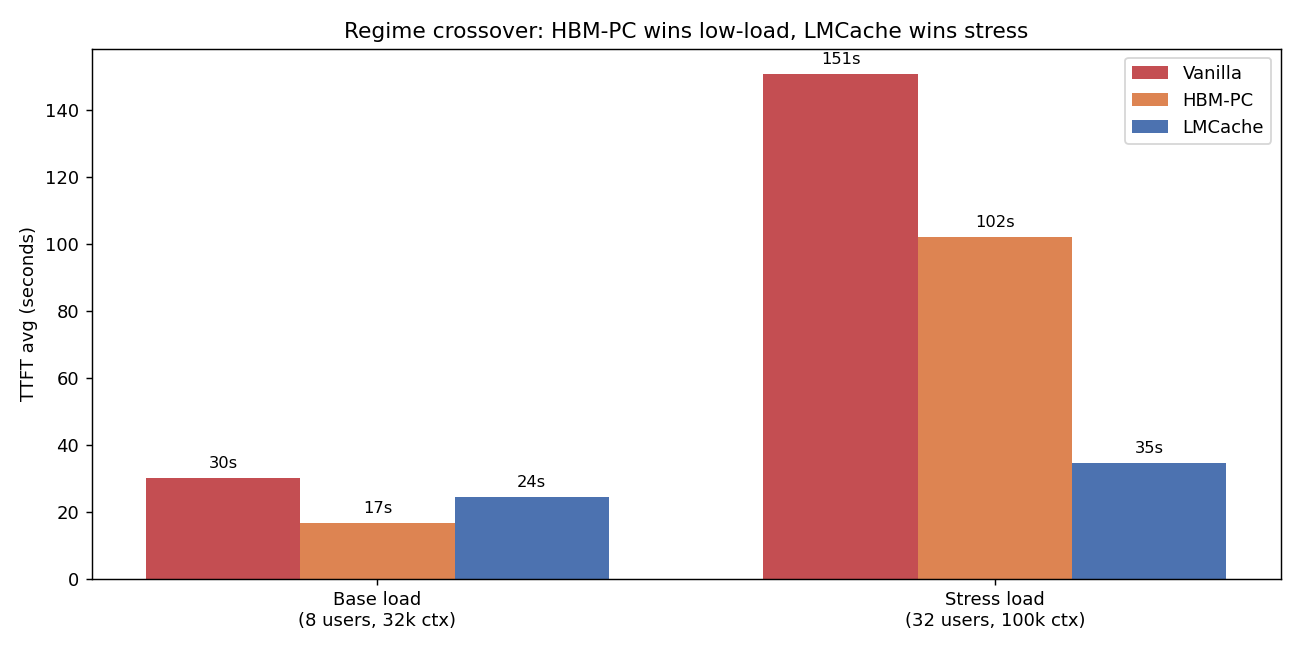
  <li><strong>Regime matters more than the strategy.</strong> HBM prefix cache wins at low load; LMCache wins decisively under stress</li>
  <li><strong>Under stress (32 users / 100k context / agentic traces):</strong> LMCache delivers <strong>3.0× lower TTFT avg, 2.1× lower p95, 2.6× lower max, 2.3× more requests</strong> vs HBM-only</li>
  <li><strong><code class="language-plaintext highlighter-rouge">PYTHONHASHSEED=0</code> is mandatory</strong> for LMCache cache-key consistency — missing this gives 0% cache hits even on bit-identical prompts</li>
  <li><strong>Synthetic cache-rate benchmarks understate LMCache’s value</strong> by ~10-17% because they don’t pressure HBM enough; use real agentic traces for honest comparisons</li>
</ul>

<p><img src="/assets/images/lmcache-bench/regime_crossover.png" alt="Regime crossover" /></p>

<hr />

<h2 id="1-introduction">1. Introduction</h2>

<h3 id="why-agentic-workloads-are-different">Why agentic workloads are different</h3>

<p>Modern coding assistants like Claude Code, Cursor, and Devin do not behave like chatbots. A typical agentic conversation:</p>
<ul>
  <li>Ships <strong>20-150k tokens of input on every turn</strong> (file contents, tool outputs, conversation history)</li>
  <li><strong>Reuses ~93-97% of its prefix across turns</strong> — only the latest tool call or response changes</li>
  <li>Lasts <strong>hours</strong>, not seconds (median 60 minutes, P75 163 minutes)</li>
  <li>Spawns <strong>sub-agents</strong> that recursively grow the context tree</li>
  <li>Heavily depends on <strong>shared system prompt + tool definitions</strong> (~12-25k tokens) cached across all conversations</li>
</ul>

<p>If you re-prefill the entire 100k-token context every turn, you waste 95% of GPU compute. The whole serving stack — caching strategy, batching, scheduling, routing — has to be designed around prefix reuse.</p>

<h3 id="whats-a-kv-cache-briefly">What’s a KV cache, briefly</h3>

<p>LLMs decode autoregressively: each new token attends back over every previous token’s K/V tensors. Storing these K/V tensors lets you skip recomputation on the next turn. A 100k-token MiniMax-M2.5 KV cache uses about 12 GB of HBM. Multiply by N concurrent users and you quickly run out of GPU memory.</p>

<p><strong>The hierarchy:</strong></p>

<table>
  <thead>
    <tr>
      <th>Tier</th>
      <th>Where</th>
      <th>Latency</th>
      <th>Capacity per node</th>
    </tr>
  </thead>
  <tbody>
    <tr>
      <td>L0</td>
      <td>GPU registers/L1</td>
      <td>ns</td>
      <td>KB</td>
    </tr>
    <tr>
      <td>L1</td>
      <td>GPU HBM</td>
      <td>μs</td>
      <td>hundreds of GB</td>
    </tr>
    <tr>
      <td><strong>L2</strong></td>
      <td><strong>CPU DRAM</strong></td>
      <td><strong>~100 μs</strong></td>
      <td><strong>TB</strong></td>
    </tr>
    <tr>
      <td>L3</td>
      <td>Local NVMe</td>
      <td>ms</td>
      <td>tens of TB</td>
    </tr>
    <tr>
      <td>L4</td>
      <td>Remote object store</td>
      <td>10s ms</td>
      <td>unbounded</td>
    </tr>
  </tbody>
</table>

<p>Production stacks tier the KV cache across L1-L3. <strong>LMCache, NVIDIA Dynamo, and SGLang HiCache are all implementations of this idea.</strong></p>

<h3 id="what-we-wanted-to-find-out">What we wanted to find out</h3>

<ol>
  <li>Can LMCache run on AMD MI300X at all? (PyPI ships CUDA-only wheels)</li>
  <li>Does it help on real agentic workloads, or only in synthetic benchmarks?</li>
  <li>Where’s the regime crossover where the L2 tier starts paying off vs HBM-only?</li>
  <li>What configuration knobs actually matter in practice?</li>
</ol>

<hr />

<h2 id="2-architecture">2. Architecture</h2>

<h3 id="the-serving-stack">The serving stack</h3>

<div class="language-plaintext highlighter-rouge"><div class="highlight"><pre class="highlight"><code>                ┌────────────────────────────────────┐
                │  trace_replay_tester.py (client)   │
                │  • 739 anonymized Claude Code      │
                │    agentic conversation traces     │
                │  • Cooldown-gated user ramp        │
                │  • Working-set + period budgets    │
                └─────────────┬──────────────────────┘
                              │ OpenAI HTTP /v1/chat/completions
                              ▼
                ┌────────────────────────────────────┐
                │       vLLM 0.19.0 ROCm             │
                │  ─────────────────────────────     │
                │  Scheduler → Prefix-cache (HBM)    │
                │  ──────────│──────────────         │
                │            │ KV connector V1 hook  │
                │            ▼                       │
                │  ┌──────────────────────┐          │
                │  │ LMCacheConnectorV1   │          │
                │  │ (BUILD_WITH_HIP=1)   │          │
                │  └─────────┬────────────┘          │
                │            │                       │
                │      ┌─────┴───────┐               │
                │      │             │               │
                │      ▼             ▼               │
                │  GPU (HBM)    CPU DRAM             │
                │  L1 cache     L2 cache (64 GB)     │
                └────────────────────────────────────┘
                              │
                              ▼
                ┌────────────────────────────────────┐
                │  MiniMax-M2.5 (230 GB FP8 MoE)     │
                │  TP=2 across 2× MI300X (192 GB)    │
                └────────────────────────────────────┘
</code></pre></div></div>

<h3 id="three-test-configurations">Three test configurations</h3>

<p>We ran the same workload three times, swapping only the KV strategy:</p>

<table>
  <thead>
    <tr>
      <th>Configuration</th>
      <th>Server flags</th>
      <th>What’s cached</th>
    </tr>
  </thead>
  <tbody>
    <tr>
      <td><strong>A: Vanilla (no cache)</strong></td>
      <td><code class="language-plaintext highlighter-rouge">--no-enable-prefix-caching</code></td>
      <td>Nothing — every prefill from scratch</td>
    </tr>
    <tr>
      <td><strong>B: HBM prefix cache</strong></td>
      <td><code class="language-plaintext highlighter-rouge">--enable-prefix-caching</code></td>
      <td>KV blocks in HBM, LRU evicted when full</td>
    </tr>
    <tr>
      <td><strong>C: LMCache DRAM</strong></td>
      <td><code class="language-plaintext highlighter-rouge">--enable-prefix-caching</code> + <code class="language-plaintext highlighter-rouge">--kv-transfer-config '{"kv_connector":"LMCacheConnectorV1","kv_role":"kv_both"}'</code></td>
      <td>HBM L1 + 64 GB CPU DRAM L2 (LRU across both)</td>
    </tr>
  </tbody>
</table>

<h3 id="what-the-trace-replay-tester-does">What the trace replay tester does</h3>

<p><a href="https://github.com/callanjfox/kv-cache-tester"><code class="language-plaintext highlighter-rouge">trace_replay_tester.py</code></a> (callanjfox/WEKA) replays 739 anonymized Claude Code conversations. Each trace contains:</p>

<div class="language-json highlighter-rouge"><div class="highlight"><pre class="highlight"><code><span class="p">{</span><span class="nl">"id"</span><span class="p">:</span><span class="s2">"trace_0001"</span><span class="p">,</span><span class="w">
 </span><span class="nl">"tool_tokens"</span><span class="p">:</span><span class="mi">12974</span><span class="p">,</span><span class="w"> </span><span class="nl">"system_tokens"</span><span class="p">:</span><span class="mi">4243</span><span class="p">,</span><span class="w">
 </span><span class="nl">"block_size"</span><span class="p">:</span><span class="mi">64</span><span class="p">,</span><span class="w"> </span><span class="nl">"hash_id_scope"</span><span class="p">:</span><span class="s2">"local"</span><span class="p">,</span><span class="w">
 </span><span class="nl">"requests"</span><span class="p">:[</span><span class="w">
   </span><span class="p">{</span><span class="nl">"t"</span><span class="p">:</span><span class="mf">0.0</span><span class="p">,</span><span class="w"> </span><span class="nl">"type"</span><span class="p">:</span><span class="s2">"n"</span><span class="p">,</span><span class="w"> </span><span class="nl">"in"</span><span class="p">:</span><span class="mi">71175</span><span class="p">,</span><span class="w"> </span><span class="nl">"out"</span><span class="p">:</span><span class="mi">169</span><span class="p">,</span><span class="w">
    </span><span class="nl">"hash_ids"</span><span class="p">:[</span><span class="mi">1</span><span class="p">,</span><span class="mi">2</span><span class="p">,</span><span class="mi">3</span><span class="p">,</span><span class="err">...</span><span class="p">,</span><span class="mi">1112</span><span class="p">]},</span><span class="w">   </span><span class="err">//</span><span class="w"> </span><span class="err">block</span><span class="w"> </span><span class="err">hashes</span><span class="w"> </span><span class="err">—</span><span class="w"> </span><span class="err">drives</span><span class="w"> </span><span class="err">cache</span><span class="w"> </span><span class="err">match</span><span class="w"> </span><span class="err">calc</span><span class="w">
   </span><span class="err">...</span><span class="p">]}</span><span class="w">
</span></code></pre></div></div>

<p>Per-trace stats (median across 739 traces):</p>
<ul>
  <li>Starting input: <strong>20,160 tokens</strong></li>
  <li>Ending input: <strong>115,008 tokens</strong></li>
  <li>Cache hit rate per conversation: <strong>96.9%</strong> (theoretical, with infinite cache)</li>
  <li>Conversation duration: <strong>60 min</strong></li>
</ul>

<p>The tester:</p>
<ol>
  <li><strong>Generates synthetic content</strong> to hit each trace’s specified <code class="language-plaintext highlighter-rouge">input_tokens</code> while preserving real assistant responses (so the model actually decodes meaningfully)</li>
  <li><strong>Pre-warms a canonical prefix</strong> (<code class="language-plaintext highlighter-rouge">--warm-prefix-pct 0.5</code>): ~12k tokens of shared tool/system content, mirrors how Claude Code keeps tool defs cached across conversations</li>
  <li><strong>Adaptively scales concurrent users</strong> based on observed p95 TTFT vs <code class="language-plaintext highlighter-rouge">--max-ttft</code> SLO — same control loop production load balancers use</li>
  <li><strong>Recycles users</strong> (<code class="language-plaintext highlighter-rouge">--recycle</code>): when one conversation completes, replace it with a fresh trace</li>
</ol>

<p>This gives you a controlled approximation of agentic production traffic without sending real Claude Code data anywhere.</p>

<hr />

<h2 id="3-implementation-getting-lmcache-running-on-mi300x">3. Implementation: getting LMCache running on MI300X</h2>

<p>This part has more sharp edges than you’d expect. Documenting them so you don’t repeat them.</p>

<h3 id="step-1-container">Step 1: Container</h3>

<div class="language-bash highlighter-rouge"><div class="highlight"><pre class="highlight"><code>docker run <span class="nt">-d</span> <span class="nt">--name</span> lmcache-bench <span class="nt">--entrypoint</span> /bin/bash <span class="se">\</span>
  <span class="nt">--device</span><span class="o">=</span>/dev/kfd <span class="nt">--device</span><span class="o">=</span>/dev/dri <span class="nt">--network</span><span class="o">=</span>host <span class="nt">--ipc</span><span class="o">=</span>host <span class="se">\</span>
  <span class="nt">--group-add</span> video <span class="nt">--cap-add</span> SYS_PTRACE <span class="se">\</span>
  <span class="nt">-v</span> /mnt/nvme/models:/work/models <span class="se">\</span>
  vllm/vllm-openai-rocm:v0.19.0 <span class="se">\</span>
  <span class="nt">-c</span> <span class="s2">"sleep infinity"</span>
</code></pre></div></div>

<h3 id="step-2-build-lmcache-from-source-pypi-wheel-is-cuda-only">Step 2: Build LMCache from source (PyPI wheel is CUDA-only)</h3>

<div class="language-bash highlighter-rouge"><div class="highlight"><pre class="highlight"><code>docker <span class="nb">exec </span>lmcache-bench bash <span class="nt">-c</span> <span class="s2">"
  git clone --depth 1 https://github.com/LMCache/LMCache.git /work/LMCache
  cd /work/LMCache &amp;&amp; BUILD_WITH_HIP=1 pip install -e . --no-build-isolation
"</span>
</code></pre></div></div>

<p><code class="language-plaintext highlighter-rouge">pip install lmcache</code> ships a CUDA-linked <code class="language-plaintext highlighter-rouge">c_ops.so</code> that fails with <code class="language-plaintext highlighter-rouge">libcudart.so.12: cannot open shared object file</code>. The source build with <code class="language-plaintext highlighter-rouge">BUILD_WITH_HIP=1</code> emits HIP bytecode that loads cleanly.</p>

<h3 id="step-3-uninstall-transitive-cuda-only-deps">Step 3: Uninstall transitive CUDA-only deps</h3>

<p>When you <code class="language-plaintext highlighter-rouge">pip install lmcache==0.4.3</code>, it pulls in <code class="language-plaintext highlighter-rouge">nixl-cu12</code>, <code class="language-plaintext highlighter-rouge">nixl_ep</code>, <code class="language-plaintext highlighter-rouge">cupy-cuda12x</code>. vLLM 0.19’s quark quantization config imports <code class="language-plaintext highlighter-rouge">nixl_ep</code> unconditionally → <code class="language-plaintext highlighter-rouge">libcuda.so.1</code> ImportError before the model even loads.</p>

<div class="language-bash highlighter-rouge"><div class="highlight"><pre class="highlight"><code>pip uninstall <span class="nt">-y</span> nixl nixl-cu12 cupy-cuda12x cufile-python cuda-pathfinder
</code></pre></div></div>

<h3 id="step-4-launch-with-the-right-flags">Step 4: Launch with the right flags</h3>

<div class="language-bash highlighter-rouge"><div class="highlight"><pre class="highlight"><code><span class="nv">VLLM_FLOAT32_MATMUL_PRECISION</span><span class="o">=</span>high <span class="se">\</span>
<span class="nv">PYTHONHASHSEED</span><span class="o">=</span>0 <span class="se">\</span>
<span class="nv">LMCACHE_LOCAL_CPU</span><span class="o">=</span><span class="nb">true</span> <span class="se">\</span>
<span class="nv">LMCACHE_CHUNK_SIZE</span><span class="o">=</span>256 <span class="se">\</span>
<span class="nv">LMCACHE_MAX_LOCAL_CPU_SIZE</span><span class="o">=</span>64 <span class="se">\</span>
vllm serve /work/models/MiniMax-M2.5 <span class="se">\</span>
  <span class="nt">--tensor-parallel-size</span> 2 <span class="nt">--gpu-memory-utilization</span> 0.85 <span class="se">\</span>
  <span class="nt">--tool-call-parser</span> minimax_m2 <span class="nt">--reasoning-parser</span> minimax_m2 <span class="se">\</span>
  <span class="nt">--enable-auto-tool-choice</span> <span class="nt">--trust-remote-code</span> <span class="se">\</span>
  <span class="nt">--enable-prefix-caching</span> <span class="se">\</span>
  <span class="nt">--kv-transfer-config</span> <span class="s1">'{"kv_connector":"LMCacheConnectorV1","kv_role":"kv_both"}'</span> <span class="se">\</span>
  <span class="nt">--host</span> 0.0.0.0 <span class="nt">--port</span> 8000
</code></pre></div></div>

<h3 id="the-three-configuration-mistakes-that-cost-the-most-time">The three configuration mistakes that cost the most time</h3>

<ol>
  <li>
    <p><strong><code class="language-plaintext highlighter-rouge">PYTHONHASHSEED=0</code> is non-negotiable.</strong> Python’s <code class="language-plaintext highlighter-rouge">hash()</code> is randomized per-process. Without a fixed seed, TP worker 0 hashes a prompt to one cache key and TP worker 1 hashes the same prompt to a different key. Even sending the same request twice from the same client misses every time. Symptom: server log shows <code class="language-plaintext highlighter-rouge">LMCache hit tokens: 0, need to load: 0</code> on bit-identical prompts.</p>
  </li>
  <li>
    <p><strong>You need <code class="language-plaintext highlighter-rouge">--enable-prefix-caching</code> (not <code class="language-plaintext highlighter-rouge">--no-enable-prefix-caching</code>)</strong> even when running LMCache. LMCache borrows vLLM’s prefix-cache hash function for cache-key derivation. Without it, you get <code class="language-plaintext highlighter-rouge">LMCache WARNING: Could not load 'builtin' from vLLM. Using builtin hash.</code> and inconsistent behavior.</p>
  </li>
  <li>
    <p><strong>Do NOT set <code class="language-plaintext highlighter-rouge">LMCACHE_SAVE_DECODE_CACHE=true</code>.</strong> It synchronously offloads every decode step to CPU, which can serialize the GPU pipeline. We saw 100-250s stalls on otherwise simple requests. Decode-cache reuse is rare in practice (each decode produces a unique tail) so the offload cost is pure overhead.</p>
  </li>
</ol>

<h3 id="recipe-specific-gotchas">Recipe-specific gotchas</h3>

<p>For MiniMax-M2 series specifically, the <a href="https://docs.vllm.ai/projects/recipes/en/latest/MiniMax/MiniMax-M2.html">official vLLM recipe</a> includes <code class="language-plaintext highlighter-rouge">--compilation-config '{"mode":3,"pass_config":{"fuse_minimax_qk_norm":true}}'</code>. This pass was added after vLLM 0.19.0 — drop it from the launch command if you’re pinned to that version.</p>

<h3 id="sanity-check">Sanity check</h3>

<p>Before running benchmarks, confirm the cache path actually fires:</p>
<div class="language-plaintext highlighter-rouge"><div class="highlight"><pre class="highlight"><code>$ curl -s http://127.0.0.1:8000/v1/chat/completions ...   # send prompt twice
# server log:
LMCache: Reqid=...80e (1030 tok, 1st pass): hit tokens: 0     ← cold (correct)
LMCache: Reqid=...8cf (1030 tok, 2nd pass): hit tokens: 1024  ← warm hit ✅
</code></pre></div></div>

<p>If the second pass shows <code class="language-plaintext highlighter-rouge">hit tokens: 0</code>, fix <code class="language-plaintext highlighter-rouge">PYTHONHASHSEED</code> before going further.</p>

<hr />

<h2 id="4-benchmarks-methodology">4. Benchmarks: methodology</h2>

<p>We ran four phases, each isolating a different question:</p>

<table>
  <thead>
    <tr>
      <th>Phase</th>
      <th>Tester</th>
      <th>Question</th>
    </tr>
  </thead>
  <tbody>
    <tr>
      <td>1</td>
      <td>Smoke test (curl)</td>
      <td>Does the server respond coherently with LMCache?</td>
    </tr>
    <tr>
      <td>2</td>
      <td><code class="language-plaintext highlighter-rouge">single_prompt_tester.py</code></td>
      <td>Does LMCache actually skip prefill on cache hits?</td>
    </tr>
    <tr>
      <td>3 base</td>
      <td><code class="language-plaintext highlighter-rouge">trace_replay_tester.py</code> low load</td>
      <td>What happens with realistic agentic traffic?</td>
    </tr>
    <tr>
      <td><strong>3 stress</strong></td>
      <td><strong><code class="language-plaintext highlighter-rouge">trace_replay_tester.py</code> high load</strong></td>
      <td><strong>Where does LMCache pay off vs HBM-only?</strong></td>
    </tr>
    <tr>
      <td>4</td>
      <td><code class="language-plaintext highlighter-rouge">cache_rate_tester.py</code> + <code class="language-plaintext highlighter-rouge">working_set_tester.py</code></td>
      <td>Synthetic sweeps for controlled comparison</td>
    </tr>
  </tbody>
</table>

<h3 id="common-settings">Common settings</h3>

<ul>
  <li>Hardware: 2× AMD MI300X (192 GB HBM each), gfx942</li>
  <li>Software: vLLM 0.19.0 + LMCache main (HIP-built) + transformers 4.57.1</li>
  <li>Model: MiniMaxAI/MiniMax-M2.5 FP8, TP=2, <code class="language-plaintext highlighter-rouge">--gpu-memory-utilization 0.78</code> (stress) or <code class="language-plaintext highlighter-rouge">0.85</code> (others)</li>
  <li>Tester: 0.5 warm-prefix, <code class="language-plaintext highlighter-rouge">think-only</code> timing, max-context 32k (base) or 100k (stress)</li>
  <li>60s <code class="language-plaintext highlighter-rouge">--max-ttft</code> SLO (stress) or 30s (base)</li>
</ul>

<hr />

<h2 id="5-results">5. Results</h2>

<h3 id="51-phase-2--lmcache-reuse-path-validated">5.1 Phase 2 — LMCache reuse path validated</h3>

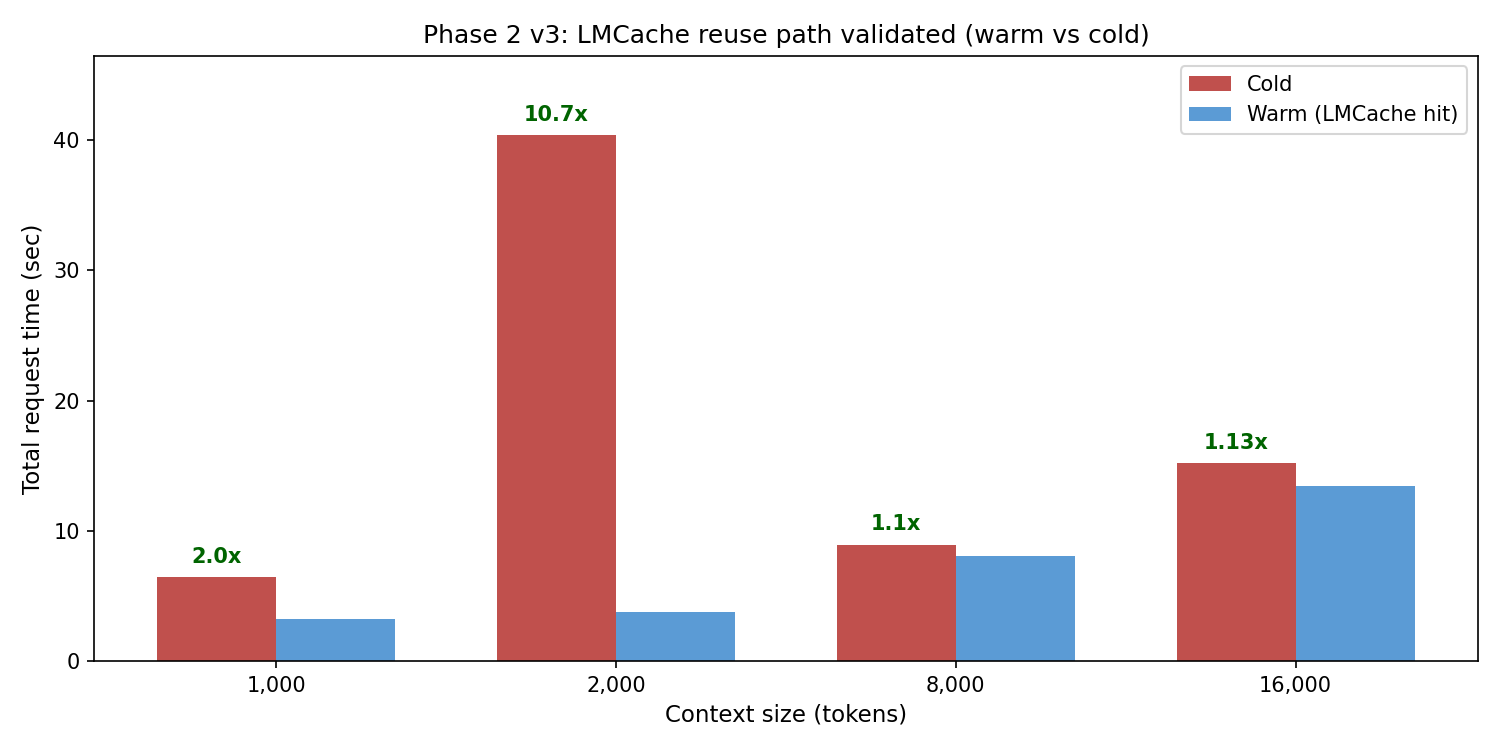
<p>Single-prompt cold-vs-warm sweep at increasing context sizes. Each request was sent twice; second iteration should hit cache and skip prefill.</p>

<p><img src="/assets/images/lmcache-bench/phase2_cold_vs_warm.png" alt="Phase 2 cold vs warm" /></p>

<table>
  <thead>
    <tr>
      <th>Context</th>
      <th>Cold (s)</th>
      <th>Warm (s)</th>
      <th>Speedup</th>
    </tr>
  </thead>
  <tbody>
    <tr>
      <td>1k</td>
      <td>6.42</td>
      <td>3.22</td>
      <td><strong>2.0×</strong></td>
    </tr>
    <tr>
      <td>2k</td>
      <td>40.4</td>
      <td>3.76</td>
      <td><strong>10.7×</strong></td>
    </tr>
    <tr>
      <td>8k</td>
      <td>8.92</td>
      <td>8.06</td>
      <td>1.1×</td>
    </tr>
    <tr>
      <td>16k</td>
      <td>15.21</td>
      <td>13.46</td>
      <td>1.13×</td>
    </tr>
  </tbody>
</table>

<p>Server logs confirmed real cache hits: <code class="language-plaintext highlighter-rouge">LMCache hit tokens: 1024 / 1792 / 3840</code> on second iterations. The reuse path works; <code class="language-plaintext highlighter-rouge">PYTHONHASHSEED=0</code> was the unlock.</p>

<h3 id="52-phase-3-base-load--hbm-prefix-cache-wins">5.2 Phase 3 base load — HBM prefix cache wins</h3>

<p>8 max users, 32k context, 10 min. Working set fits comfortably in HBM at TP=2.</p>

<table>
  <thead>
    <tr>
      <th>Metric</th>
      <th>Vanilla</th>
      <th>HBM-PC</th>
      <th>LMCache</th>
    </tr>
  </thead>
  <tbody>
    <tr>
      <td>Reqs completed</td>
      <td>9</td>
      <td><strong>52</strong></td>
      <td>25</td>
    </tr>
    <tr>
      <td>Peak users</td>
      <td>2</td>
      <td><strong>8</strong></td>
      <td>3</td>
    </tr>
    <tr>
      <td>TTFT avg (s)</td>
      <td>30.05</td>
      <td><strong>16.66</strong></td>
      <td>24.29</td>
    </tr>
    <tr>
      <td>TTFT p50 (s)</td>
      <td>25.99</td>
      <td><strong>0.00</strong></td>
      <td>32.30</td>
    </tr>
    <tr>
      <td>TTFT p95 (s)</td>
      <td>54.11</td>
      <td>65.08</td>
      <td><strong>48.08</strong></td>
    </tr>
    <tr>
      <td>Workload cache hit rate</td>
      <td>63.4%</td>
      <td>55.5%</td>
      <td><strong>84.0%</strong></td>
    </tr>
  </tbody>
</table>

<p><strong>HBM prefix cache won decisively</strong> at this load — 5.8× more requests, 2× lower TTFT vs vanilla, sustained 8 users vs 2 for vanilla. LMCache added overhead without unlocking the L2 tier (working set fit in L1).</p>

<h3 id="53-phase-3-stress--lmcache-wins-decisively">5.3 Phase 3 STRESS — LMCache wins decisively</h3>

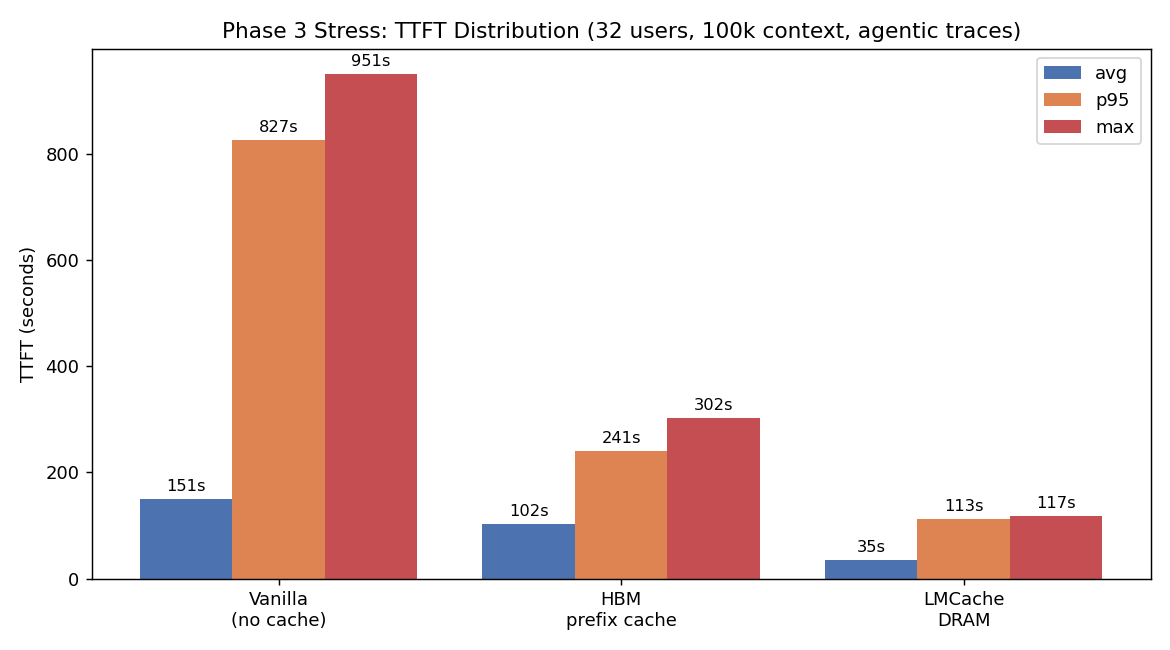
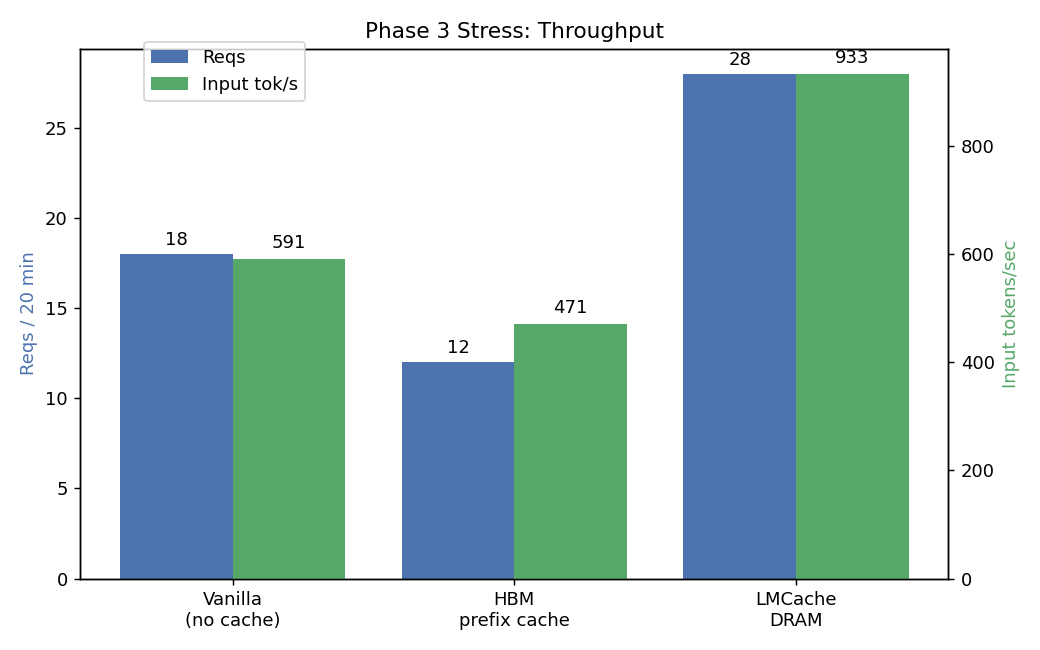
<p>32 max users, 100k context, 20 min, GPU memory util reduced to 0.78 to force HBM pressure.</p>

<p><img src="/assets/images/lmcache-bench/phase3_stress_ttft.png" alt="Phase 3 stress TTFT" /></p>

<p><img src="/assets/images/lmcache-bench/phase3_stress_throughput.png" alt="Phase 3 stress throughput" /></p>

<table>
  <thead>
    <tr>
      <th>Metric</th>
      <th>Vanilla</th>
      <th>HBM-PC</th>
      <th>LMCache</th>
    </tr>
  </thead>
  <tbody>
    <tr>
      <td>Reqs completed</td>
      <td>18</td>
      <td>12</td>
      <td><strong>28</strong></td>
    </tr>
    <tr>
      <td>TTFT avg (s)</td>
      <td>150.84</td>
      <td>102.17</td>
      <td><strong>34.59</strong></td>
    </tr>
    <tr>
      <td>TTFT p50 (s)</td>
      <td>0.00</td>
      <td>117.15</td>
      <td>29.86</td>
    </tr>
    <tr>
      <td>TTFT p95 (s)</td>
      <td>826.69</td>
      <td>240.87</td>
      <td><strong>112.78</strong></td>
    </tr>
    <tr>
      <td>TTFT max (s)</td>
      <td>950.96</td>
      <td>301.72</td>
      <td><strong>117.38</strong></td>
    </tr>
    <tr>
      <td>Input throughput (tok/s)</td>
      <td>591</td>
      <td>471</td>
      <td><strong>933</strong></td>
    </tr>
    <tr>
      <td>Working set held</td>
      <td>191k tok</td>
      <td>230k tok</td>
      <td><strong>312k</strong> (+36%)</td>
    </tr>
    <tr>
      <td>Workload cache hit rate</td>
      <td>69.2%</td>
      <td>64.4%</td>
      <td><strong>72.4%</strong></td>
    </tr>
  </tbody>
</table>

<p><strong>LMCache wins:</strong></p>
<ul>
  <li>vs Vanilla: 4.4× lower TTFT avg, 7.3× lower p95, 8.1× lower max, 1.6× more reqs</li>
  <li>vs HBM-PC: <strong>3.0× lower TTFT avg, 2.1× lower p95, 2.6× lower max, 2.3× more reqs</strong></li>
  <li>Holds 36% more working set with the same HBM budget</li>
</ul>

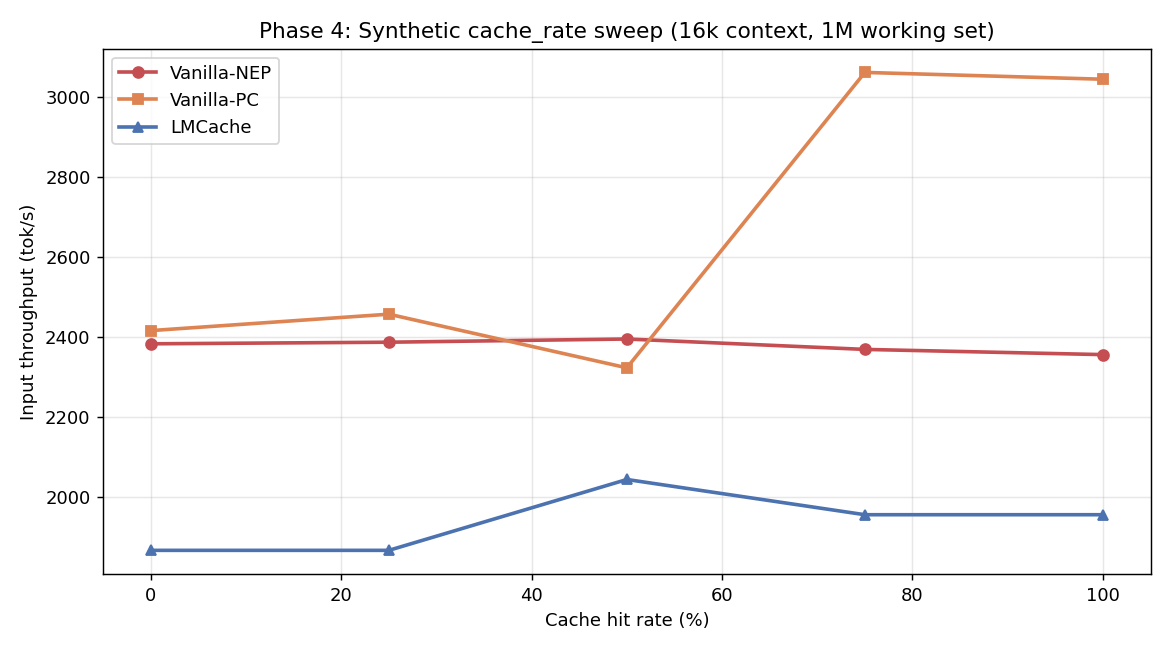
<h3 id="54-phase-4-synthetic-sweeps--surprising-negative">5.4 Phase 4 synthetic sweeps — surprising negative</h3>

<p>Same 3-configuration comparison but with <code class="language-plaintext highlighter-rouge">cache_rate_tester.py</code> (controlled 0/25/50/75/100% hit rates) and 1M token working set.</p>

<p><img src="/assets/images/lmcache-bench/phase4_cache_rate_16k.png" alt="Phase 4 cache_rate at 16k context" /></p>

<table>
  <thead>
    <tr>
      <th>16k context</th>
      <th>Hit%</th>
      <th>Vanilla-NEP</th>
      <th>Vanilla-PC</th>
      <th>LMCache</th>
    </tr>
  </thead>
  <tbody>
    <tr>
      <td>(tok/s)</td>
      <td>0</td>
      <td>2,383</td>
      <td>2,416</td>
      <td>1,867</td>
    </tr>
    <tr>
      <td> </td>
      <td>25</td>
      <td>2,387</td>
      <td>2,457</td>
      <td>1,867</td>
    </tr>
    <tr>
      <td> </td>
      <td>50</td>
      <td>2,395</td>
      <td>2,323</td>
      <td>2,044</td>
    </tr>
    <tr>
      <td> </td>
      <td>75</td>
      <td>2,369</td>
      <td><strong>3,061</strong></td>
      <td>1,956</td>
    </tr>
    <tr>
      <td> </td>
      <td>100</td>
      <td>2,356</td>
      <td><strong>3,044</strong></td>
      <td>1,956</td>
    </tr>
  </tbody>
</table>

<p><strong>LMCache underperforms by 10-17%</strong> in this synthetic test. Why? The 1M nominal working set still fits in HBM at TP=2. The DRAM tier is unused but the connector overhead (key hashing, lookups, no-op transfers) is paid on every request.</p>

<p>This is a <strong>critical lesson</strong>: synthetic benchmarks with controlled hit rates can give misleading negative results for L2 caches. They don’t generate enough working-set pressure to expose where the L2 tier actually pays off.</p>

<hr />

<h2 id="6-key-findings">6. Key Findings</h2>

<h3 id="finding-1-regime-crossover-is-the-central-question">Finding 1: Regime crossover is the central question</h3>

<p>There is no universal “always enable LMCache” answer. The break-even is <strong>working set vs HBM efficient capacity</strong>. For our setup (MiniMax-M2.5 FP8 TP=2 on 2× MI300X), the crossover sits around <strong>250-300k token sustained working set</strong>. Below that, HBM prefix cache is sufficient. Above that, LMCache pays off non-linearly.</p>

<table>
  <thead>
    <tr>
      <th>Working set</th>
      <th>Recommended strategy</th>
    </tr>
  </thead>
  <tbody>
    <tr>
      <td>&lt; 100k tokens</td>
      <td>HBM prefix cache (vanilla-PC)</td>
    </tr>
    <tr>
      <td>100-250k tokens</td>
      <td>HBM prefix cache, monitor for eviction</td>
    </tr>
    <tr>
      <td>250-500k tokens</td>
      <td><strong>LMCache DRAM</strong></td>
    </tr>
    <tr>
      <td>&gt; 500k tokens</td>
      <td>LMCache DRAM, consider NVMe L3 tier</td>
    </tr>
  </tbody>
</table>

<h3 id="finding-2-pythonhashseed-is-the-silent-killer">Finding 2: PYTHONHASHSEED is the silent killer</h3>

<p>Most LMCache deployment failures we’d guess are caused by missing <code class="language-plaintext highlighter-rouge">PYTHONHASHSEED=0</code>. Symptom: 0% cache hit rate even on bit-identical prompts; LMCache logs show <code class="language-plaintext highlighter-rouge">Could not load 'builtin' from vLLM. Using builtin hash. ... You MUST set PYTHONHASHSEED to ensure consistent hashing.</code></p>

<p>This is in the LMCache config docs but easy to miss. <strong>Treat it as mandatory.</strong></p>

<h3 id="finding-3-decode-is-the-bottleneck-not-prefill">Finding 3: Decode is the bottleneck, not prefill</h3>

<p>Across all our runs, output throughput was <strong>1-8 tok/s aggregate</strong>. MiniMax-M2.5 + TP=2 + AITER on MI300X is decode-bound at the concurrencies that fit in TTFT SLO. KV caching only attacks the prefill side.</p>

<p>For a real production deployment, the next dollar should go to:</p>
<ul>
  <li><strong>FP8 KV cache</strong> (we ran BF16 KV) — 2× capacity at &lt;0.5% quality loss</li>
  <li><strong>Speculative decoding</strong> (Eagle-2/Medusa) — 2-3× decode speedup</li>
  <li><strong>PD disaggregation</strong> at &gt;2-node scale — solves prefill blocking decode</li>
</ul>

<p>KV caching is necessary but not sufficient.</p>

<h3 id="finding-4-tp2--lmcacheconnectorv1-has-a-deadlock-under-sustained-load">Finding 4: TP=2 + LMCacheConnectorV1 has a deadlock under sustained load</h3>

<p>We hit a <code class="language-plaintext highlighter-rouge">shm_broadcast: No available shared memory broadcast block found in 60 seconds</code> deadlock during one of our Phase 3 runs. Both TP workers alive, no preemptions, no waiting requests, but no progress for 6+ minutes. Reproduced once, didn’t reproduce on retry with different settings. Worth filing upstream against vLLM and/or LMCache.</p>

<h3 id="finding-5-synthetic-benchmarks-lie-about-l2-cache-value">Finding 5: Synthetic benchmarks lie about L2 cache value</h3>

<p><code class="language-plaintext highlighter-rouge">cache_rate_tester</code> with controlled hit rates <strong>didn’t generate enough working-set pressure</strong> to make the L2 tier useful. LMCache showed -10 to -17% throughput in those tests. The agentic trace replay (Phase 3 stress) — same model, same hardware — showed <strong>+200% throughput</strong>. The difference: realistic working-set distributions and concurrent-user pressure.</p>

<p><strong>Always benchmark caching strategies on representative workloads, not synthetic mixtures.</strong></p>

<h3 id="finding-6-ttft-gated-ramp-control-is-the-right-way-to-think-about-concurrency">Finding 6: TTFT-gated ramp control is the right way to think about concurrency</h3>

<p>Across every test, peak concurrent users plateaued at 4-8 — not because of HBM limits but because the ramp controller refused to add more users while p95 TTFT exceeded the SLO threshold. This mirrors how production load balancers throttle. The “throughput numbers” you see in our results aren’t peak GPU utilization — they’re <strong>steady-state throughput within an SLO</strong>, which is what actually matters.</p>

<hr />

<h2 id="7-best-practices">7. Best Practices</h2>

<h3 id="for-evaluating-cache-strategies">For evaluating cache strategies</h3>

<ol>
  <li><strong>Use real workload traces, not synthetic mixes.</strong> The <a href="https://github.com/callanjfox/kv-cache-tester">kv-cache-tester</a> dataset provides 739 anonymized Claude Code traces. There’s no excuse to evaluate L2 caching with toy benchmarks.</li>
  <li><strong>Test under stress, not just nominal load.</strong> Cache strategies look identical at low load. The whole point of L2 caching is the long tail.</li>
  <li><strong>Keep <code class="language-plaintext highlighter-rouge">--max-ttft</code> realistic</strong> (5-30s for chat, 30-120s for agentic) — too high and you’re measuring queue depth, too low and you cripple ramp.</li>
  <li><strong>Three configurations minimum</strong>: no-cache (lower bound), HBM-only (cheap baseline), L2-cache (your proposal). Anything less hides the regime story.</li>
</ol>

<h3 id="for-lmcache-deployment-on-mi300x">For LMCache deployment on MI300X</h3>

<ol>
  <li><strong>Build from source</strong> with <code class="language-plaintext highlighter-rouge">BUILD_WITH_HIP=1</code>, do not use the PyPI wheel</li>
  <li><strong>Set <code class="language-plaintext highlighter-rouge">PYTHONHASHSEED=0</code></strong> in the server’s env</li>
  <li><strong>Enable vLLM’s prefix cache</strong> (<code class="language-plaintext highlighter-rouge">--enable-prefix-caching</code>) so LMCache can reuse its hash function</li>
  <li><strong>Don’t enable <code class="language-plaintext highlighter-rouge">LMCACHE_SAVE_DECODE_CACHE</code></strong> — it stalls the decode pipeline</li>
  <li><strong>Size the L2 pool generously</strong> (<code class="language-plaintext highlighter-rouge">LMCACHE_MAX_LOCAL_CPU_SIZE=64</code> GB+) — DRAM is cheap, evictions hurt</li>
  <li><strong>Use FP8 weights and FP8 KV cache</strong> to maximize HBM L1 capacity before pushing to L2</li>
  <li><strong>Monitor <code class="language-plaintext highlighter-rouge">LMCache hit tokens: N</code> in server logs</strong> to verify the cache path is firing in production</li>
</ol>

<h3 id="for-agentic-serving-in-general">For agentic serving in general</h3>

<ol>
  <li><strong>Sticky session routing</strong> is non-negotiable — without it, conversation N+1 lands on a fresh replica and gets zero cache reuse</li>
  <li><strong>Cache-control markers in your prompts</strong> (Anthropic-style <code class="language-plaintext highlighter-rouge">cache_control: {"type": "ephemeral"}</code>) make explicit what the server should keep warm</li>
  <li><strong>Byte-identical message serialization across turns</strong> — JSON key reordering, whitespace changes, timestamp diffs all silently destroy cache hits</li>
  <li><strong>PD disaggregation at &gt;2-node scale</strong> — runs prefill on burst-capacity replicas, decode on KV-cache-resident replicas. LMCache and PD are complementary; production stacks like Mooncake combine both.</li>
  <li><strong>Speculative decoding</strong> — Eagle-2/Medusa give 2-3× decode speedup. Bigger throughput win than any cache layer for decode-bound workloads.</li>
</ol>

<h3 id="when-not-to-deploy-lmcache">When NOT to deploy LMCache</h3>

<ul>
  <li>Working set comfortably fits HBM (most chat workloads)</li>
  <li>Decode-bound serving where prefill cost is already small relative to decode</li>
  <li>Single-node deployments where you don’t have spare DRAM bandwidth</li>
  <li>TP &gt; 4 with vLLM 0.19.x (KV connector deadlock risk; needs investigation)</li>
</ul>

<hr />

<h2 id="8-reproduce">8. Reproduce</h2>

<p>To reproduce a single configuration:</p>

<div class="language-bash highlighter-rouge"><div class="highlight"><pre class="highlight"><code><span class="c"># 1. Container + LMCache build (one time)</span>
docker run <span class="nt">-d</span> <span class="nt">--name</span> lmcache-bench <span class="nt">--entrypoint</span> /bin/bash <span class="se">\</span>
  <span class="nt">--device</span><span class="o">=</span>/dev/kfd <span class="nt">--device</span><span class="o">=</span>/dev/dri <span class="nt">--network</span><span class="o">=</span>host <span class="nt">--ipc</span><span class="o">=</span>host <span class="se">\</span>
  <span class="nt">--group-add</span> video <span class="nt">--cap-add</span> SYS_PTRACE <span class="se">\</span>
  <span class="nt">-v</span> /your/models:/work/models <span class="se">\</span>
  vllm/vllm-openai-rocm:v0.19.0 <span class="nt">-c</span> <span class="s2">"sleep infinity"</span>

docker <span class="nb">exec </span>lmcache-bench bash <span class="nt">-c</span> <span class="s2">"
  pip uninstall -y nixl nixl-cu12 cupy-cuda12x cufile-python cuda-pathfinder
  git clone --depth 1 https://github.com/LMCache/LMCache.git /work/LMCache
  cd /work/LMCache &amp;&amp; BUILD_WITH_HIP=1 pip install -e . --no-build-isolation
"</span>

<span class="c"># 2. Server (LMCache stress configuration)</span>
docker <span class="nb">exec</span> <span class="nt">-d</span> lmcache-bench bash <span class="nt">-c</span> <span class="s2">"
  VLLM_FLOAT32_MATMUL_PRECISION=high PYTHONHASHSEED=0 </span><span class="se">\</span><span class="s2">
  LMCACHE_LOCAL_CPU=true LMCACHE_CHUNK_SIZE=256 LMCACHE_MAX_LOCAL_CPU_SIZE=64 </span><span class="se">\</span><span class="s2">
  vllm serve /work/models/MiniMax-M2.5 </span><span class="se">\</span><span class="s2">
    --tensor-parallel-size 2 --gpu-memory-utilization 0.78 </span><span class="se">\</span><span class="s2">
    --enable-prefix-caching </span><span class="se">\</span><span class="s2">
    --kv-transfer-config '{</span><span class="se">\"</span><span class="s2">kv_connector</span><span class="se">\"</span><span class="s2">:</span><span class="se">\"</span><span class="s2">LMCacheConnectorV1</span><span class="se">\"</span><span class="s2">,</span><span class="se">\"</span><span class="s2">kv_role</span><span class="se">\"</span><span class="s2">:</span><span class="se">\"</span><span class="s2">kv_both</span><span class="se">\"</span><span class="s2">}' </span><span class="se">\</span><span class="s2">
    --tool-call-parser minimax_m2 --reasoning-parser minimax_m2 </span><span class="se">\</span><span class="s2">
    --enable-auto-tool-choice --trust-remote-code </span><span class="se">\</span><span class="s2">
    --host 0.0.0.0 --port 8000
"</span>

<span class="c"># 3. Trace replay client</span>
git clone https://github.com/callanjfox/kv-cache-tester.git
<span class="nb">cd </span>kv-cache-tester
python3 trace_replay_tester.py <span class="se">\</span>
  <span class="nt">--api-endpoint</span> http://127.0.0.1:8000 <span class="se">\</span>
  <span class="nt">--trace-directory</span> traces <span class="se">\</span>
  <span class="nt">--start-users</span> 4 <span class="nt">--max-users</span> 32 <span class="se">\</span>
  <span class="nt">--max-ttft</span> 60.0 <span class="nt">--test-duration</span> 1200 <span class="se">\</span>
  <span class="nt">--max-context</span> 100000 <span class="nt">--warm-prefix-pct</span> 0.5 <span class="se">\</span>
  <span class="nt">--timing-strategy</span> think-only <span class="nt">--recycle</span> <span class="se">\</span>
  <span class="nt">--output-dir</span> ./results
</code></pre></div></div>

<hr />

<h2 id="9-acknowledgments">9. Acknowledgments</h2>

<ul>
  <li><strong>callanjfox / WEKA</strong> for the <a href="https://github.com/callanjfox/kv-cache-tester">kv-cache-tester</a> toolkit and the 739 anonymized Claude Code agentic traces</li>
  <li><strong>LMCache team</strong> for the connector and the source-friendly build system</li>
  <li><strong>Hot Aisle</strong> for the MI300X access</li>
</ul>

<hr />

<p><em>Bench environment: ENC1-CLS01-SVR08, 2× AMD MI300X (gfx942, 192 GB HBM each), ROCm 7.0.0, vLLM 0.19.0, LMCache main (commit ~2026-04). All raw CSVs and run logs in the linked repository.</em></p>]]></content><author><name></name></author><category term="LLM" /><category term="AMD" /><category term="MI300X" /><category term="vLLM" /><category term="LMCache" /><category term="Performance" /><summary type="html"><![CDATA[A practitioner’s guide to KV-cache tiering on ROCm — what works, what doesn’t, and the regime where it actually matters.]]></summary></entry><entry><title type="html">Run GLM-4.6V on AMD MI300X GPU with vLLM</title><link href="https://andyluo7.github.io/llm/amd/mi300x/vllm/2025/12/09/run-glm-4-6v-on-amd-mi300x-with-vllm/" rel="alternate" type="text/html" title="Run GLM-4.6V on AMD MI300X GPU with vLLM" /><published>2025-12-09T00:00:00+00:00</published><updated>2025-12-09T00:00:00+00:00</updated><id>https://andyluo7.github.io/llm/amd/mi300x/vllm/2025/12/09/run-glm-4-6v-on-amd-mi300x-with-vllm</id><content type="html" xml:base="https://andyluo7.github.io/llm/amd/mi300x/vllm/2025/12/09/run-glm-4-6v-on-amd-mi300x-with-vllm/"><![CDATA[<p><a href="https://huggingface.co/zai-org/GLM-4.6V">GLM-4.6V</a> is the latest multimodal model from Z.AI, designed to bridge the gap between visual perception and executable action. In this post, we’ll explore what makes GLM-4.6V special and how you can run it on AMD’s powerful MI300X GPUs using vLLM.</p>

<h2 id="1-overview-about-glm-46v">1. Overview about GLM-4.6V</h2>

<p>GLM-4.6V is a 106B parameter foundation model that achieves State-of-the-Art (SoTA) performance in visual understanding, comparable to other leading models like GPT-4V. It introduces several groundbreaking capabilities:</p>

<ul>
  <li><strong>Native Multimodal Function Calling:</strong> Unlike previous models that required converting visual inputs to text descriptions, GLM-4.6V can directly process images, screenshots, and documents as tool inputs. It can also generate visual outputs like charts and rendered pages, integrating them into its reasoning chain.</li>
  <li><strong>Interleaved Image-Text Content Generation:</strong> The model can synthesize coherent content that mixes text and images, ideal for generating rich reports or articles.</li>
  <li><strong>Multimodal Document Understanding:</strong> With a context window of up to 128k tokens, it can process and understand long documents, charts, and complex layouts without OCR pre-processing.</li>
  <li><strong>Frontend Replication &amp; Visual Editing:</strong> It can reconstruct HTML/CSS from screenshots and support natural language-driven edits.</li>
</ul>

<p>For those with more constrained resources, a lightweight version, <strong>GLM-4.6V-Flash (9B)</strong>, is also available for local deployment.</p>

<h2 id="2-how-to-run-on-amd-mi300x-gpu">2. How to run on AMD MI300X GPU</h2>

<p>Running GLM-4.6V on AMD MI300X is straightforward thanks to vLLM support. Ensure you have a working ROCm environment set up for your MI300X.</p>

<h3 id="prerequisites--installation">Prerequisites &amp; Installation</h3>

<p>Try it by launching the vLLM container:</p>

<div class="language-bash highlighter-rouge"><div class="highlight"><pre class="highlight"><code>docker run <span class="nt">-it</span> <span class="se">\</span>
 <span class="nt">--privileged</span> <span class="se">\</span>
 <span class="nt">--network</span><span class="o">=</span>host <span class="se">\</span>
 <span class="nt">--group-add</span><span class="o">=</span>video <span class="se">\</span>
 <span class="nt">--ipc</span><span class="o">=</span>host <span class="se">\</span>
 <span class="nt">--cap-add</span><span class="o">=</span>SYS_PTRACE <span class="se">\</span>
 <span class="nt">--security-opt</span> <span class="nv">seccomp</span><span class="o">=</span>unconfined <span class="se">\</span>
 <span class="nt">--device</span> /dev/kfd <span class="se">\</span>
 <span class="nt">--device</span> /dev/dri <span class="se">\</span>
 <span class="nt">--name</span> vllm-omni <span class="se">\</span>
 rocm/vllm-dev:nightly
</code></pre></div></div>

<p>You need to install <code class="language-plaintext highlighter-rouge">transformers</code> with version &gt;= 0.5.0</p>

<div class="language-bash highlighter-rouge"><div class="highlight"><pre class="highlight"><code>https://github.com/huggingface/transformers.git
pip <span class="nb">install</span> <span class="s1">'.[torch]'</span>
</code></pre></div></div>

<h3 id="running-inference">Running Inference</h3>

<p>Launch vLLM server inside the container:</p>

<div class="language-bash highlighter-rouge"><div class="highlight"><pre class="highlight"><code>vllm serve zai-org/GLM-4.6V <span class="se">\</span>
     <span class="nt">--tensor-parallel-size</span> 4 <span class="se">\</span>
     <span class="nt">--tool-call-parser</span> glm45 <span class="se">\</span>
     <span class="nt">--reasoning-parser</span> glm45 <span class="se">\</span>
     <span class="nt">--enable-auto-tool-choice</span> <span class="se">\</span>
     <span class="nt">--enable-expert-parallel</span> <span class="se">\</span>
     <span class="nt">--allowed-local-media-path</span> / <span class="se">\</span>
     <span class="nt">--mm-encoder-tp-mode</span> data <span class="se">\</span>
     <span class="nt">--mm_processor_cache_type</span> shm
</code></pre></div></div>
<p>You can also use –tensor-parallel-size 2 and 8 to run on 2 or 8 MI300X GPU. 
The same command can be used to run zai-org/GLM-4.6V-FP8 on 1, 2, 4, 8 MI300X GPU.</p>

<p>Once vLLM server is launched, here are two quick examples of demonstrating the capabilities of GLM-4.6V.</p>

<h4 id="example-1-visual-grounding">Example 1: Visual Grounding</h4>

<p><img src="https://cloudcovert-1305175928.cos.ap-guangzhou.myqcloud.com/%E5%9B%BE%E7%89%87grounding.PNG" alt="Visual Grounding Example" /></p>

<div class="language-text highlighter-rouge"><div class="highlight"><pre class="highlight"><code>curl -X POST \
    http://localhost:8000/v1/chat/completions \
    -H "Content-Type: application/json" \
    -d '{
        "model": "zai-org/GLM-4.6V",
        "messages": [
            {
                "role": "user",
                "content": [
                    {
                        "type": "image_url",
                        "image_url": {
                            "url": "https://cloudcovert-1305175928.cos.ap-guangzhou.myqcloud.com/%E5%9B%BE%E7%89%87grounding.PNG"
                        }
                    },
                    {
                        "type": "text",
                        "text": "Where is the second bottle of beer from the right on the table?  Provide coordinates in [[xmin,ymin,xmax,ymax]] format"
                    }
                ]
            }
        ],
        "thinking": {
            "type":"enabled"
        }
    }'
</code></pre></div></div>

<p>The output:</p>

<pre style="white-space: pre-wrap;">
{
  "id": "chatcmpl-afb2ac2dce2bd986",
  "object": "chat.completion",
  "created": 1765416718,
  "model": "zai-org/GLM-4.6V",
  "choices": [
    {
      "index": 0,
      "message": {
        "role": "assistant",
        "content": "\nThe coordinates of the second bottle of beer from the right on the table are &lt;|begin_of_box|&gt;[[94,598,177,991]]&lt;|end_of_box|&gt;.",
        "refusal": null,
        "annotations": null,
        "audio": null,
        "function_call": null,
        "tool_calls": [],
        "reasoning": "The image shows an outdoor table setting with various items on it, including bottles of beer. The question asks for the coordinates of the second bottle of beer from the right on the table. By visually inspecting the table, we identify the bottles of beer and count from the right - hand side to find the second one. Then, we determine the bounding box coordinates of that specific bottle.",
        "reasoning_content": "The image shows an outdoor table setting with various items on it, including bottles of beer. The question asks for the coordinates of the second bottle of beer from the right on the table. By visually inspecting the table, we identify the bottles of beer and count from the right - hand side to find the second one. Then, we determine the bounding box coordinates of that specific bottle."
      },
      "logprobs": null,
      "finish_reason": "stop",
      "stop_reason": 151336,
      "token_ids": null
    }
  ],
  "service_tier": null,
  "system_fingerprint": null,
  "usage": {
    "prompt_tokens": 696,
    "total_tokens": 807,
    "completion_tokens": 111,
    "prompt_tokens_details": null
  },
  "prompt_logprobs": null,
  "prompt_token_ids": null,
  "kv_transfer_params": null
}
</pre>

<p>You can see it can successfully identify the second bottle of beer from the right on the table and provide the coordinates [94,598,177,991]. It also shows the reasoning process in the “reasoning_content” field.</p>

<h4 id="example-2-visual-understanding">Example 2: Visual Understanding</h4>

<p><img src="https://cdn.bigmodel.cn/markdown/1765174983998image.png" alt="Visual Grounding Example" /></p>

<div class="language-text highlighter-rouge"><div class="highlight"><pre class="highlight"><code>curl -X POST \
  http://localhost:8000/v1/chat/completions \
  -H "Content-Type: application/json" \
  -d '{
    "model": "zai-org/GLM-4.6V",
    "messages": [
      {
        "role": "user",
        "content": [
          {
            "type": "image_url",
            "image_url": {
              "url": "https://cdn.bigmodel.cn/markdown/1765174983998image.png"
            }
          },
          {
            "type": "text",
            "text": "Identify the breeds of all cats in the image. Return the results in valid JSON format. The result should be a list, where each element in the list corresponds to a dictionary of target detection results. The dictionary keys are label and bbox_2d, with values being the detected cat breed and the result bounding box coordinates respectively. For example: [{\"label\": \"Golden Shorthair-1\", \"bbox_2d\": [1,2,3,4]}, {\"label\": \"Golden Shorthair-2\", \"bbox_2d\": [4,5,6,7]}]"
          }
        ]
      }
    ],
    "thinking": {
      "type": "enabled"
    }
  }'
</code></pre></div></div>

<p>The output:</p>

<pre style="white-space: pre-wrap;">
{
  "id": "chatcmpl-ad870121ef1f16e5",
  "object": "chat.completion",
  "created": 1765417439,
  "model": "zai-org/GLM-4.6V",
  "choices": [
    {
      "index": 0,
      "message": {
        "role": "assistant",
        "content": "\nThe list of cat breeds and their bounding box coordinates in the required JSON format is &lt;|begin_of_box|&gt;[{\"label\": \"American Shorthair-1\", \"bbox_2d\": [109, 152, 193, 822]}, {\"label\": \"American Shorthair-2\", \"bbox_2d\": [191, 331, 311, 852]}, {\"label\": \"American Shorthair-3\", \"bbox_2d\": [299, 347, 434, 899]}, {\"label\": \"Domestic Shorthair-1\", \"bbox_2d\": [422, 523, 516, 913]}, {\"label\": \"American Shorthair-4\", \"bbox_2d\": [505, 257, 609, 852]}, {\"label\": \"American Shorthair-5\", \"bbox_2d\": [606, 445, 710, 855]}, {\"label\": \"Maine Coon-1\", \"bbox_2d\": [696, 92, 819, 822]}, {\"label\": \"American Shorthair-6\", \"bbox_2d\": [808, 473, 886, 825]}]&lt;|end_of_box|&gt;.",
        "refusal": null,
        "annotations": null,
        "audio": null,
        "function_call": null,
        "tool_calls": [],
        "reasoning": "The image shows a group of cats of various breeds and sizes standing against a white background. The task is to identify the breed of each cat and provide the bounding box coordinates in a specific JSON - format. To do this, I need to visually analyze each cat in the image, determine its breed based on physical characteristics such as fur pattern, color, and body shape, and then estimate the bounding box coordinates for each cat. I will go through each cat one by one, starting from the left - most cat and moving to the right, and create a dictionary for each with the 'label' key for the breed and 'bbox_2d' key for the coordinates.",
        "reasoning_content": "The image shows a group of cats of various breeds and sizes standing against a white background. The task is to identify the breed of each cat and provide the bounding box coordinates in a specific JSON - format. To do this, I need to visually analyze each cat in the image, determine its breed based on physical characteristics such as fur pattern, color, and body shape, and then estimate the bounding box coordinates for each cat. I will go through each cat one by one, starting from the left - most cat and moving to the right, and create a dictionary for each with the 'label' key for the breed and 'bbox_2d' key for the coordinates."
      },
      "logprobs": null,
      "finish_reason": "stop",
      "stop_reason": 151336,
      "token_ids": null
    }
  ],
  "service_tier": null,
  "system_fingerprint": null,
  "usage": {
    "prompt_tokens": 635,
    "total_tokens": 1058,
    "completion_tokens": 423,
    "prompt_tokens_details": null
  },
  "prompt_logprobs": null,
  "prompt_token_ids": null,
  "kv_transfer_params": null
}
</pre>

<p>You can see it can successfully identify the breeds of all cats in the image and provide the bounding box coordinates in the required JSON format.</p>

<h4 id="example-3-video-understanding">Example 3: Video Understanding</h4>

<p>Here is an example of using a video as input. We will use a sample video of a dog running.</p>

<p>Video URL: <a href="https://modelscope.oss-cn-beijing.aliyuncs.com/test/images/dog.mp4">Sample Video</a></p>

<video width="640" height="360" controls="">
  <source src="https://andyluo7.github.io/assets/hunyuan_video_1.5_00001_.mp4" type="video/mp4" />
  Your browser does not support the video tag.
</video>

<div class="language-text highlighter-rouge"><div class="highlight"><pre class="highlight"><code>curl -X POST \
  http://localhost:8000/v1/chat/completions \
  -H "Content-Type: application/json" \
  -d '{
    "model": "zai-org/GLM-4.6V",
    "messages": [
      {
        "role": "user",
        "content": [
          {
            "type": "video_url",
            "video_url": {
              "url": "https://andyluo7.github.io/assets/hunyuan_video_1.5_00001_.mp4"
            }
          },
          {
            "type": "text",
            "text": "Describe the video in detail."
          }
        ]
      }
    ]
  }'
</code></pre></div></div>

<p>The output:</p>

<pre style="white-space: pre-wrap;">
{
  "id": "chatcmpl-video-example",
  "object": "chat.completion",
  "created": 1765418000,
  "model": "zai-org/GLM-4.6V",
  "choices": [
    {
      "index": 0,
      "message": {
        "role": "assistant",
        "content": "The video presents a dynamic and immersive sequence of a white paper airplane flying through a dense urban cityscape. The perspective is from a high altitude, looking down upon a sprawling metropolis of tall skyscrapers, likely a city like New York. The scene is bathed in a warm, golden light, suggesting the time is either sunrise or sunset.\n\nThe video begins with a wide shot, establishing the vastness of the city. A single, simple white paper airplane is seen soaring between the towering buildings. As the video progresses, the camera initiates a rapid, forward-moving dolly shot, descending towards the plane. This creates a thrilling sense of motion, as if the viewer is flying alongside the paper airplane. The buildings appear to rush past, and the perspective shifts from a distant overview to a much closer, more intimate view of the plane navigating the narrow streets and canyons between the skyscrapers.\n\nThe camera continues to track the plane's flight path, maintaining a close distance as it weaves through the city. The motion is smooth and continuous, emphasizing the speed and freedom of the paper airplane's journey. Towards the end, the camera pulls back slightly, offering a broader view of the city skyline as the plane flies towards the distant horizon, leaving the viewer with a sense of adventure and possibility. The overall effect is a visually striking and imaginative portrayal of a simple object undertaking a grand journey through a complex urban environment.",
        "refusal": null,
        "annotations": null,
        "audio": null,
        "function_call": null,
        "tool_calls": [],
        "reasoning": "This is a detailed description of the video based on the provided seconds.\n\n### Thinking Process\n\n1.  **Initial Observation:** I will examine the sequence of seconds to understand the overall narrative and visual style. The seconds show a consistent scene with a clear subject and a dynamic camera movement.\n2.  **Identify the Subject:** The central object is a white paper airplane. It's the focal point of the entire sequence.\n3.  **Analyze the Environment:** The background is a dense, urban cityscape, viewed from a high vantage point. The buildings are tall skyscrapers, suggesting a major city like New York. The lighting suggests it's either early morning or late afternoon, with a warm, golden hue.\n4.  **Describe the Camera Movement:** The camera is not static. It appears to be moving forward and downward, tracking the paper airplane. This creates a sense of motion and immersion, as if the viewer is flying alongside the plane. The perspective shifts from a high, distant view to a much closer, more intimate one.\n5.  **Sequence the Events:** I will describe the video chronologically.\n    *   **Beginning:** The video starts with a wide, high-angle shot of the city. The paper airplane is seen flying between the skyscrapers.\n    *   **Middle:** The camera rapidly moves forward and descends, getting closer to the plane. The buildings seem to rush past, creating a sense of speed. The plane navigates through the narrow canyons formed by the tall buildings.\n    *   **End:** The camera pulls back slightly, offering a wider view of the city skyline as the plane continues its flight towards the horizon.\n6.  **Note Visual Details:** I'll mention the warm color grading, the motion blur that emphasizes speed, and the contrast between the simple, white paper airplane and the complex, massive city below.\n7.  **Synthesize into a Coherent Description:** I will combine these observations into a detailed, flowing paragraph that captures the essence of the video.\n\n***",
        "reasoning_content": "This is a detailed description of the video based on the provided seconds.\n\n### Thinking Process\n\n1.  **Initial Observation:** I will examine the sequence of seconds to understand the overall narrative and visual style. The seconds show a consistent scene with a clear subject and a dynamic camera movement.\n2.  **Identify the Subject:** The central object is a white paper airplane. It's the focal point of the entire sequence.\n3.  **Analyze the Environment:** The background is a dense, urban cityscape, viewed from a high vantage point. The buildings are tall skyscrapers, suggesting a major city like New York. The lighting suggests it's either early morning or late afternoon, with a warm, golden hue.\n4.  **Describe the Camera Movement:** The camera is not static. It appears to be moving forward and downward, tracking the paper airplane. This creates a sense of motion and immersion, as if the viewer is flying alongside the plane. The perspective shifts from a high, distant view to a much closer, more intimate one.\n5.  **Sequence the Events:** I will describe the video chronologically.\n    *   **Beginning:** The video starts with a wide, high-angle shot of the city. The paper airplane is seen flying between the skyscrapers.\n    *   **Middle:** The camera rapidly moves forward and descends, getting closer to the plane. The buildings seem to rush past, creating a sense of speed. The plane navigates through the narrow canyons formed by the tall buildings.\n    *   **End:** The camera pulls back slightly, offering a wider view of the city skyline as the plane continues its flight towards the horizon.\n6.  **Note Visual Details:** I'll mention the warm color grading, the motion blur that emphasizes speed, and the contrast between the simple, white paper airplane and the complex, massive city below.\n7.  **Synthesize into a Coherent Description:** I will combine these observations into a detailed, flowing paragraph that captures the essence of the video.\n\n***",
      },
      "logprobs": null,
      "finish_reason": "stop",
      "stop_reason": :151336,
      "token_ids": null
    }
  ],
  "service_tier": null,
  "system_fingerprint": null,
  "usage": {
    "prompt_tokens": 19246,
    "total_tokens": 19951,
    "completion_tokens": 705,
    "prompt_tokens_details": null
  },
  "prompt_logprobs": null,
  "prompt_token_ids": null,
  "kv_transfer_params": null
}
</pre>

<p>You can see that GLM-4.6V can effectively process video content and output a coherent description of the scene.</p>

<h2 id="3-summary">3. Summary</h2>

<p>GLM-4.6V represents a significant leap forward in open multimodal AI, bringing native visual tool use and long-context understanding to the forefront. When paired with the high-bandwidth memory and compute power of AMD MI300X GPUs, it becomes a formidable tool for enterprise-grade multimodal applications.</p>

<p>We encourage you to try running GLM-4.6V on your AMD infrastructure today! Check out the <a href="https://docs.z.ai/guides/vlm/glm-4.6v">official documentation</a> and the <a href="https://huggingface.co/zai-org/GLM-4.6V">Hugging Face model card</a> for more deep dives.</p>]]></content><author><name></name></author><category term="LLM" /><category term="AMD" /><category term="MI300X" /><category term="vLLM" /><summary type="html"><![CDATA[GLM-4.6V is the latest multimodal model from Z.AI, designed to bridge the gap between visual perception and executable action. In this post, we’ll explore what makes GLM-4.6V special and how you can run it on AMD’s powerful MI300X GPUs using vLLM.]]></summary></entry><entry><title type="html">Running FLUX.2, HunyuanVideo-1.5, and Z-Image-Turbo on AMD MI300X</title><link href="https://andyluo7.github.io/ai/2025/11/27/mi300x-image-video-models/" rel="alternate" type="text/html" title="Running FLUX.2, HunyuanVideo-1.5, and Z-Image-Turbo on AMD MI300X" /><published>2025-11-27T17:00:00+00:00</published><updated>2025-11-27T17:00:00+00:00</updated><id>https://andyluo7.github.io/ai/2025/11/27/mi300x-image-video-models</id><content type="html" xml:base="https://andyluo7.github.io/ai/2025/11/27/mi300x-image-video-models/"><![CDATA[<p>I spent some time bringing a few trending open image and video genernation models to AMD MI300X GPU and wanted to jot down a repeatable path. The focus here is to get first frames/images out easily and quickly. Simple pip install only. Performance is less concern.</p>

<ul>
  <li><strong>FLUX.2-dev</strong>: Black Forest Labs’s new text-to-image generation model with improved realism, text adherence, and image editing capabilities.</li>
  <li><strong>HunyuanVideo-1.5</strong>: Tencent’s latest video generation model that delivers top-tier quality with only 8.3B parameters.</li>
  <li><strong>Z-Image-Turbo</strong>: An efficient image generation model with Single-Stream Diffusion Transformer.</li>
</ul>

<p>The prerequsite is to have access to AMD MI300X GPU, which is available on various CSPs including <a href="https://devcloud.amd.com/">AMD Developer Cloud</a> with free developer credit.</p>

<h3 id="1-base-setup">1) Base setup</h3>

<ul>
  <li>OS: recent Ubuntu (22.04 or similar) with kernel that ships ROCm 6.x/7.x drivers.</li>
  <li>GPU runtime: ROCm 6.x/7.x with <code class="language-plaintext highlighter-rouge">rocminfo</code> and <code class="language-plaintext highlighter-rouge">rocm-smi</code> working.</li>
</ul>

<p>Quick sanity:</p>

<div class="language-bash highlighter-rouge"><div class="highlight"><pre class="highlight"><code>rocm-smi
</code></pre></div></div>
<p>We will see something like this, which shows 8 MI300X GPUs in one node,</p>

<p><img src="/assets/mi300x-rocm-smi.png" alt="workflow" /></p>

<p>You will see one GPU listed if you are using single GPU snapshot from <a href="https://devcloud.amd.com/">AMD Developer Cloud</a>.</p>

<p>Single MI300X GPU is sufficient enough to run all the 3 models.</p>

<h3 id="2-get-started">2) Get Started</h3>

<p>Install uv if not installed yet</p>

<div class="language-bash highlighter-rouge"><div class="highlight"><pre class="highlight"><code>curl <span class="nt">-LsSf</span> https://astral.sh/uv/install.sh | sh
<span class="nb">source</span> <span class="nv">$HOME</span>/.local/bin/env
</code></pre></div></div>

<p>Install Pytorch, Diffusers, Transformers etc.</p>

<div class="language-bash highlighter-rouge"><div class="highlight"><pre class="highlight"><code>uv pip <span class="nb">install</span> <span class="nt">--pre</span> torch torchvision torchaudio <span class="nt">--index-url</span> https://download.pytorch.org/whl/nightly/rocm7.1
uv pip <span class="nb">install</span> <span class="s2">"git+https://github.com/huggingface/diffusers.git"</span>
uv pip <span class="nb">install</span> <span class="s2">"transformers&gt;=4.45.0"</span> huggingface_hub requests safetensors accelerate
</code></pre></div></div>

<p>Install ComfyUI</p>

<div class="language-bash highlighter-rouge"><div class="highlight"><pre class="highlight"><code>git clone https://github.com/comfyanonymous/ComfyUI.git
<span class="nb">cd</span> <span class="nv">$HOME</span>/ComfyUI
uv pip <span class="nb">install</span> <span class="nt">-r</span> requirements.txt
</code></pre></div></div>

<h3 id="3-flux2-dev-image">3) FLUX.2-dev (image)</h3>

<p>There are 2 ways to run FLUX.2-dev, with diffusers or ComfyUI.</p>

<h4 id="31-diffusers">3.1) diffusers</h4>

<p>Minimal script (assumes HF auth token in <code class="language-plaintext highlighter-rouge">HF_TOKEN</code> if the model is gated):</p>

<div class="language-text highlighter-rouge"><div class="highlight"><pre class="highlight"><code>python - &lt;&lt;'PY'
import torch
from diffusers import Flux2Pipeline

# Full FLUX.2 [dev] open-weights checkpoint (no bitsandbytes)
repo_id = "black-forest-labs/FLUX.2-dev"
device = "cuda"          # on ROCm builds, "cuda" aliases to AMD GPUs
torch_dtype = torch.bfloat16

# Load full Flux2 pipeline (text encoder + DiT + VAE) in bf16
pipe = Flux2Pipeline.from_pretrained(
    repo_id,
    torch_dtype=torch_dtype,
)

# Move everything to MI300X
pipe.to(device)

prompt = (
    "Realistic macro photograph of a hermit crab using a soda can as its shell, "
    "partially emerging from the can, captured with sharp detail and natural colors, "
    "on a sunlit beach with soft shadows and a shallow depth of field, with blurred "
    "ocean waves in the background. The can has the text `BFL Diffusers` on it and "
    "it has a color gradient that start with #FF5733 at the top and transitions to "
    "#33FF57 at the bottom."
)

# Reproducible generator tied to the GPU
generator = torch.Generator(device=device).manual_seed(42)

image = pipe(
    prompt=prompt,
    generator=generator,
    num_inference_steps=50,  # 28 is a good trade-off if you want faster
    guidance_scale=4.0,
    height=1024,
    width=1024,
).images[0]
image.save("flux2_output.png")
print("Saved flux2_output.png")
PY
</code></pre></div></div>

<p>The image will be generated in around 12 seconds. Here is my generated one,</p>

<p><img src="/assets/flux2_output.png" alt="FLUX.2 sample output — hermit crab in a soda can on the beach" /></p>

<h4 id="32-comfyui">3.2) ComfyUI</h4>

<p>Download model files and put them into right places in ComfyUI</p>

<div class="language-bash highlighter-rouge"><div class="highlight"><pre class="highlight"><code>huggingface-cli download Comfy-Org/flux2-dev <span class="nt">--local-dir</span> <span class="nv">$HOME</span>/Comfy-Org-flux2-dev
<span class="nb">cp</span> <span class="nv">$HOME</span>/Comfy-Org-flux2-dev/split_files/vae/flux2-vae.safetensors <span class="nv">$HOME</span>/ComfyUI/models/vae
<span class="nb">cp</span> <span class="nv">$HOME</span>/Comfy-Org-flux2-dev/split_files/text_encoders/mistral_3_small_flux2_fp8.safetensors <span class="nv">$HOME</span>/ComfyUI/models/text_encoders/
<span class="nb">cp</span> <span class="nv">$HOME</span>/Comfy-Org-flux2-dev/split_files/diffusion_models/flux2_dev_fp8mixed.safetensors <span class="nv">$HOME</span>/ComfyUI/models/diffusion_models/
</code></pre></div></div>

<p>Run ComfyUI</p>

<div class="language-bash highlighter-rouge"><div class="highlight"><pre class="highlight"><code><span class="nv">TORCH_ROCM_AOTRITON_ENABLE_EXPERIMENTAL</span><span class="o">=</span>1 python main.py <span class="nt">--use-pytorch-cross-attention</span>
</code></pre></div></div>

<p>You should see something like this,</p>

<div class="language-plaintext highlighter-rouge"><div class="highlight"><pre class="highlight"><code>Checkpoint files will always be loaded safely.
Total VRAM 196592 MB, total RAM 2321759 MB
pytorch version: 2.10.0.dev20251123+rocm7.1

...

Starting server

To see the GUI go to: http://127.0.0.1:8188
</code></pre></div></div>

<p>I used a remote MI300X server with IP address 64.139.222.215. To use ComfyUI in web browser on my macbook, I need to map it to the localhost by follows on 
the terminal on my macbook,</p>

<div class="language-bash highlighter-rouge"><div class="highlight"><pre class="highlight"><code>ssh <span class="nt">-L</span> 8188:127.0.0.1:8188 amd@64.139.222.215
</code></pre></div></div>

<p>Please change amd@64.139.222.215 accordingly to your account and IP address of MI300X server. 
Please also keep the terminal which runs the port mapping open while you use ComfyUI.</p>

<p>Next, launch web browser on your host computer and visit http://localhost:8188/. You should be able to see ComfyUI open and up.</p>

<p>Then go to <a href="https://comfyanonymous.github.io/ComfyUI_examples/flux2/#basic-example-workflow">https://comfyanonymous.github.io/ComfyUI_examples/flux2/#basic-example-workflow</a> and drag the image to ComfyUI in the web browser to get the workflow.</p>

<p>Download <code class="language-plaintext highlighter-rouge">sunset.png</code> and <code class="language-plaintext highlighter-rouge">fennec_girl_sing.png</code> from <a href="https://github.com/andyluo7/andyluo7.github.io/tree/main/assets">https://github.com/andyluo7/andyluo7.github.io/tree/main/assets</a> and put them into <code class="language-plaintext highlighter-rouge">$HOME/ComfyUI/input</code>.</p>

<p>You can see the workflow in ComfyUI as follows, click the blue “Run” botton at the top right corner to generate the image.</p>

<p><img src="/assets/comfyui-flux2.png" alt="workflow" /></p>

<p>The prompt is “cute anime girl with gigantic fennec ears and a big fluffy fox tail with long wavy blonde hair and large blue eyes blonde colored eyelashes wearing a pink sweater a large oversized gold trimmed black winter coat and a long blue maxi skirt and a red scarf, she is happy while singing on stage like an idol while holding a microphone, there are colorful lights, it is a postcard held by a hand in front of a beautiful city at sunset and there is cursive writing that says “Flux 2, Now in ComfyUI”,</p>

<p>It tooks around 15s to generate the 1024x1024 image in 20 steps shown as follows. It consumes 27% of VRAM in single MI300X GPU.</p>

<video controls="" width="640" poster="/assets/flux2_example.png">
  <source src="/assets/1128.mp4" type="video/mp4" />
  Your browser does not support the video tag.
</video>

<h3 id="4-hunyuanvideo-15-video">4) HunyuanVideo-1.5 (video)</h3>

<p>We will use ComfyUI to run Tencent’s HunyuanVideo-1.5 video generation model, the same way we ran FLUX.2-dev as above.</p>

<p>Download model files and put them into right places in ComfyUI</p>

<div class="language-bash highlighter-rouge"><div class="highlight"><pre class="highlight"><code>huggingface-cli download Comfy-Org/HunyuanVideo_1.5_repackaged <span class="nt">--local-dir</span> <span class="nv">$HOME</span>/HunyuanVideo_1.5_repackaged
<span class="nb">cp</span> <span class="nv">$HOME</span>/HunyuanVideo_1.5_repackaged/split_files/text_encoders/<span class="k">*</span>.<span class="k">*</span> <span class="nv">$HOME</span>/ComfyUI/models/text_encoders
<span class="nb">cp</span> <span class="nv">$HOME</span>/HunyuanVideo_1.5_repackaged/split_files/vae/<span class="k">*</span>.<span class="k">*</span> <span class="nv">$HOME</span>/ComfyUI/models/vae
<span class="nb">cp</span> <span class="nv">$HOME</span>/HunyuanVideo_1.5_repackaged/split_files/diffusion_models/<span class="k">*</span>.<span class="k">*</span> <span class="nv">$HOME</span>/ComfyUI/models/diffusion_models
<span class="nb">cp</span> <span class="nv">$HOME</span>/HunyuanVideo_1.5_repackaged/split_files/latent_upscale_models/<span class="k">*</span>.<span class="k">*</span> <span class="nv">$HOME</span>/ComfyUI/models/latent_upscale_models
<span class="nb">cp</span> <span class="nv">$HOME</span>/HunyuanVideo_1.5_repackaged/split_files/clip_vision/<span class="k">*</span>.<span class="k">*</span> <span class="nv">$HOME</span>/ComfyUI/models/clip_vision
<span class="nb">cp</span> <span class="nv">$HOME</span>/HunyuanVideo_1.5_repackaged/split_files/loras/<span class="k">*</span>.<span class="k">*</span> <span class="nv">$HOME</span>/ComfyUI/models/loras
</code></pre></div></div>

<p>Run ComfyUI</p>

<div class="language-bash highlighter-rouge"><div class="highlight"><pre class="highlight"><code><span class="nv">TORCH_ROCM_AOTRITON_ENABLE_EXPERIMENTAL</span><span class="o">=</span>1 python main.py <span class="nt">--use-pytorch-cross-attention</span>
</code></pre></div></div>

<p>Open Workflow</p>

<p>We will use 720p Text-to-Video workflow. Please download https://github.com/Comfy-Org/workflow_templates/blob/main/templates/video_hunyuan_video_1.5_720p_t2v.json and
drag it to ComfyUI in the web browser to open it. You will see something like this, click the blue “Run” botton at the top right corner to generate the video.</p>

<p><img src="/assets/comfyui-hunyuanvideo-1.5.png" alt="workflow" /></p>

<p>The prompt is “A paper airplane released from the top of a skyscraper, gliding through urban canyons, crossing traffic, flying over streets, spiraling upward between buildings. The camera follows the paper airplane’s perspective, shooting cityscape in first-person POV, finally flying toward the sunset, disappearing in golden light. Creative camera movement, free perspective, dreamlike colors.”.</p>

<p>It will take more than 10 minutes to generate a 720p video with 5 second length, shown below, in 20 steps. It consumes 18% of VRAM for single MI300X GPU during execution.</p>

<video controls="" width="640" poster="/assets/hunyuan_video_1.5_00001_preview.png">
  <source src="/assets/hunyuan_video_1.5_00001_.mp4" type="video/mp4" />
  Your browser does not support the video tag.
</video>

<h3 id="5-z-image-turbo-image">5) Z-Image-Turbo (image)</h3>

<p>This model emphasizes speed with great quality. It can run with diffusers using following Python code,</p>

<div class="language-text highlighter-rouge"><div class="highlight"><pre class="highlight"><code>python - &lt;&lt;'PY'
import torch
from diffusers import ZImagePipeline

# 1. Load the pipeline
# Use bfloat16 for optimal performance on supported GPUs
pipe = ZImagePipeline.from_pretrained(
    "Tongyi-MAI/Z-Image-Turbo",
    torch_dtype=torch.bfloat16,
    low_cpu_mem_usage=False,
)
pipe.to("cuda")

prompt = "Young Chinese woman in red Hanfu, intricate embroidery. Impeccable makeup, red floral forehead pattern. Elaborate high bun, golden phoenix headdress, red flowers, beads. Holds round folding fan with lady, trees, bird. Neon lightning-bolt lamp (⚡️), bright yellow glow, above extended left palm. Soft-lit outdoor night background, silhouetted tiered pagoda (西安大雁塔), blurred colorful distant lights."

# 2. Generate Image
image = pipe(
    prompt=prompt,
    height=1024,
    width=1024,
    num_inference_steps=9,  # This actually results in 8 DiT forwards
    guidance_scale=0.0,     # Guidance should be 0 for the Turbo models
    generator=torch.Generator("cuda").manual_seed(42),
).images[0]

image.save("example.png")
PY
</code></pre></div></div>
<p>It runs blazingly fast and generates the image instantly. Here is the generated image,</p>

<p><img src="/assets/z-image-turbo-example.png" alt="example-image" /></p>

<h3 id="6-next-step">6) Next step</h3>

<p>This blog focuses on Out-of-the-Box experience of running these fresh new models on single AMD MI300X GPU.</p>

<p>For optimized performance, we can use aiter backend, which includes Flash Attention, with diffusers. We can also try cache inference to speed up HunyuanVideo-1.5.</p>

<p>We can also use multiple MI300X GPUs to reduce the latency for single request and increase the throughput for multiple batched requests.</p>

<p>We can also use Radeon GPU or AIPC like Strix-Halo to build interesting applications with these powerful image and video generation models.</p>]]></content><author><name></name></author><category term="ai" /><summary type="html"><![CDATA[I spent some time bringing a few trending open image and video genernation models to AMD MI300X GPU and wanted to jot down a repeatable path. The focus here is to get first frames/images out easily and quickly. Simple pip install only. Performance is less concern.]]></summary></entry><entry><title type="html">Kicking Off</title><link href="https://andyluo7.github.io/updates/2025/11/27/fresh-start/" rel="alternate" type="text/html" title="Kicking Off" /><published>2025-11-27T14:00:00+00:00</published><updated>2025-11-27T14:00:00+00:00</updated><id>https://andyluo7.github.io/updates/2025/11/27/fresh-start</id><content type="html" xml:base="https://andyluo7.github.io/updates/2025/11/27/fresh-start/"><![CDATA[<p>Thanks for dropping by. This site will collect build notes, experiments, and write-ups on what I’m learning. Expect posts on:</p>

<ul>
  <li>Tools and workflows I rely on.</li>
  <li>Project retrospectives—what worked and what didn’t.</li>
  <li>Short notes that future me (and maybe you) will want within reach.</li>
</ul>

<p>If you’d like to follow along, add the RSS feed in your reader or check back periodically. Here we go.</p>]]></content><author><name></name></author><category term="updates" /><summary type="html"><![CDATA[Thanks for dropping by. This site will collect build notes, experiments, and write-ups on what I’m learning. Expect posts on:]]></summary></entry></feed>