Run GLM-4.6V on AMD MI300X GPU with vLLM
GLM-4.6V is the latest multimodal model from Z.AI, designed to bridge the gap between visual perception and executable action. In this post, we’ll explore what makes GLM-4.6V special and how you can run it on AMD’s powerful MI300X GPUs using vLLM.
1. Overview about GLM-4.6V
GLM-4.6V is a 106B parameter foundation model that achieves State-of-the-Art (SoTA) performance in visual understanding, comparable to other leading models like GPT-4V. It introduces several groundbreaking capabilities:
- Native Multimodal Function Calling: Unlike previous models that required converting visual inputs to text descriptions, GLM-4.6V can directly process images, screenshots, and documents as tool inputs. It can also generate visual outputs like charts and rendered pages, integrating them into its reasoning chain.
- Interleaved Image-Text Content Generation: The model can synthesize coherent content that mixes text and images, ideal for generating rich reports or articles.
- Multimodal Document Understanding: With a context window of up to 128k tokens, it can process and understand long documents, charts, and complex layouts without OCR pre-processing.
- Frontend Replication & Visual Editing: It can reconstruct HTML/CSS from screenshots and support natural language-driven edits.
For those with more constrained resources, a lightweight version, GLM-4.6V-Flash (9B), is also available for local deployment.
2. How to run on AMD MI300X GPU
Running GLM-4.6V on AMD MI300X is straightforward thanks to vLLM support. Ensure you have a working ROCm environment set up for your MI300X.
Prerequisites & Installation
Try it by launching the vLLM container:
docker run -it \
 --privileged \
 --network=host \
 --group-add=video \
 --ipc=host \
 --cap-add=SYS_PTRACE \
 --security-opt seccomp=unconfined \
 --device /dev/kfd \
 --device /dev/dri \
 --name vllm-omni \
 rocm/vllm-dev:nightly
You need to install transformers with version >= 0.5.0
https://github.com/huggingface/transformers.git
pip install '.[torch]'
Running Inference
Launch vLLM server inside the container:
vllm serve zai-org/GLM-4.6V \
     --tensor-parallel-size 4 \
     --tool-call-parser glm45 \
     --reasoning-parser glm45 \
     --enable-auto-tool-choice \
     --enable-expert-parallel \
     --allowed-local-media-path / \
     --mm-encoder-tp-mode data \
     --mm_processor_cache_type shm
You can also use –tensor-parallel-size 2 and 8 to run on 2 or 8 MI300X GPU. The same command can be used to run zai-org/GLM-4.6V-FP8 on 1, 2, 4, 8 MI300X GPU.
Once vLLM server is launched, here are two quick examples of demonstrating the capabilities of GLM-4.6V.
Example 1: Visual Grounding
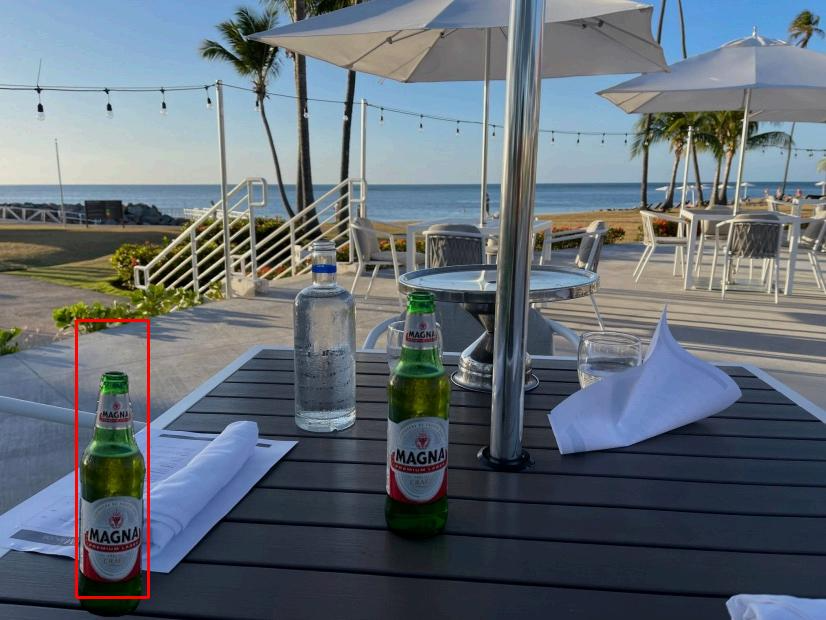
curl -X POST \
    http://localhost:8000/v1/chat/completions \
    -H "Content-Type: application/json" \
    -d '{
        "model": "zai-org/GLM-4.6V",
        "messages": [
            {
                "role": "user",
                "content": [
                    {
                        "type": "image_url",
                        "image_url": {
                            "url": "https://cloudcovert-1305175928.cos.ap-guangzhou.myqcloud.com/%E5%9B%BE%E7%89%87grounding.PNG"
                        }
                    },
                    {
                        "type": "text",
                        "text": "Where is the second bottle of beer from the right on the table?  Provide coordinates in [[xmin,ymin,xmax,ymax]] format"
                    }
                ]
            }
        ],
        "thinking": {
            "type":"enabled"
        }
    }'
The output:
{
  "id": "chatcmpl-afb2ac2dce2bd986",
  "object": "chat.completion",
  "created": 1765416718,
  "model": "zai-org/GLM-4.6V",
  "choices": [
    {
      "index": 0,
      "message": {
        "role": "assistant",
        "content": "\nThe coordinates of the second bottle of beer from the right on the table are <|begin_of_box|>[[94,598,177,991]]<|end_of_box|>.",
        "refusal": null,
        "annotations": null,
        "audio": null,
        "function_call": null,
        "tool_calls": [],
        "reasoning": "The image shows an outdoor table setting with various items on it, including bottles of beer. The question asks for the coordinates of the second bottle of beer from the right on the table. By visually inspecting the table, we identify the bottles of beer and count from the right - hand side to find the second one. Then, we determine the bounding box coordinates of that specific bottle.",
        "reasoning_content": "The image shows an outdoor table setting with various items on it, including bottles of beer. The question asks for the coordinates of the second bottle of beer from the right on the table. By visually inspecting the table, we identify the bottles of beer and count from the right - hand side to find the second one. Then, we determine the bounding box coordinates of that specific bottle."
      },
      "logprobs": null,
      "finish_reason": "stop",
      "stop_reason": 151336,
      "token_ids": null
    }
  ],
  "service_tier": null,
  "system_fingerprint": null,
  "usage": {
    "prompt_tokens": 696,
    "total_tokens": 807,
    "completion_tokens": 111,
    "prompt_tokens_details": null
  },
  "prompt_logprobs": null,
  "prompt_token_ids": null,
  "kv_transfer_params": null
}
You can see it can successfully identify the second bottle of beer from the right on the table and provide the coordinates [94,598,177,991]. It also shows the reasoning process in the “reasoning_content” field.
Example 2: Visual Understanding
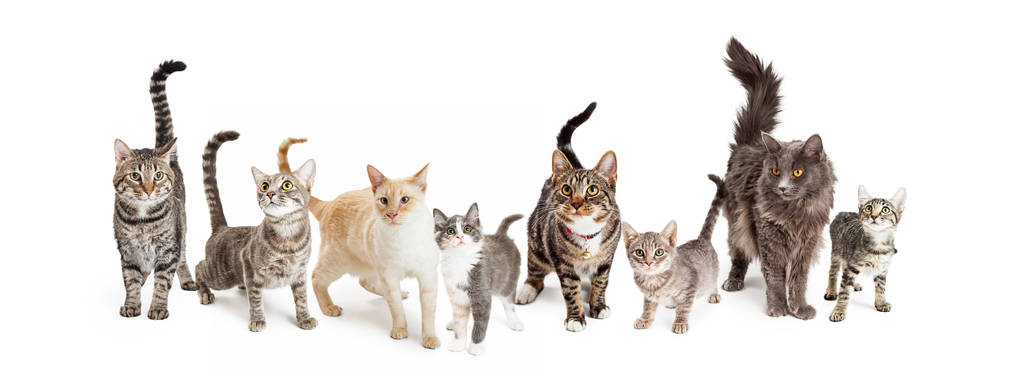
curl -X POST \
  http://localhost:8000/v1/chat/completions \
  -H "Content-Type: application/json" \
  -d '{
    "model": "zai-org/GLM-4.6V",
    "messages": [
      {
        "role": "user",
        "content": [
          {
            "type": "image_url",
            "image_url": {
              "url": "https://cdn.bigmodel.cn/markdown/1765174983998image.png"
            }
          },
          {
            "type": "text",
            "text": "Identify the breeds of all cats in the image. Return the results in valid JSON format. The result should be a list, where each element in the list corresponds to a dictionary of target detection results. The dictionary keys are label and bbox_2d, with values being the detected cat breed and the result bounding box coordinates respectively. For example: [{\"label\": \"Golden Shorthair-1\", \"bbox_2d\": [1,2,3,4]}, {\"label\": \"Golden Shorthair-2\", \"bbox_2d\": [4,5,6,7]}]"
          }
        ]
      }
    ],
    "thinking": {
      "type": "enabled"
    }
  }'
The output:
{
  "id": "chatcmpl-ad870121ef1f16e5",
  "object": "chat.completion",
  "created": 1765417439,
  "model": "zai-org/GLM-4.6V",
  "choices": [
    {
      "index": 0,
      "message": {
        "role": "assistant",
        "content": "\nThe list of cat breeds and their bounding box coordinates in the required JSON format is <|begin_of_box|>[{\"label\": \"American Shorthair-1\", \"bbox_2d\": [109, 152, 193, 822]}, {\"label\": \"American Shorthair-2\", \"bbox_2d\": [191, 331, 311, 852]}, {\"label\": \"American Shorthair-3\", \"bbox_2d\": [299, 347, 434, 899]}, {\"label\": \"Domestic Shorthair-1\", \"bbox_2d\": [422, 523, 516, 913]}, {\"label\": \"American Shorthair-4\", \"bbox_2d\": [505, 257, 609, 852]}, {\"label\": \"American Shorthair-5\", \"bbox_2d\": [606, 445, 710, 855]}, {\"label\": \"Maine Coon-1\", \"bbox_2d\": [696, 92, 819, 822]}, {\"label\": \"American Shorthair-6\", \"bbox_2d\": [808, 473, 886, 825]}]<|end_of_box|>.",
        "refusal": null,
        "annotations": null,
        "audio": null,
        "function_call": null,
        "tool_calls": [],
        "reasoning": "The image shows a group of cats of various breeds and sizes standing against a white background. The task is to identify the breed of each cat and provide the bounding box coordinates in a specific JSON - format. To do this, I need to visually analyze each cat in the image, determine its breed based on physical characteristics such as fur pattern, color, and body shape, and then estimate the bounding box coordinates for each cat. I will go through each cat one by one, starting from the left - most cat and moving to the right, and create a dictionary for each with the 'label' key for the breed and 'bbox_2d' key for the coordinates.",
        "reasoning_content": "The image shows a group of cats of various breeds and sizes standing against a white background. The task is to identify the breed of each cat and provide the bounding box coordinates in a specific JSON - format. To do this, I need to visually analyze each cat in the image, determine its breed based on physical characteristics such as fur pattern, color, and body shape, and then estimate the bounding box coordinates for each cat. I will go through each cat one by one, starting from the left - most cat and moving to the right, and create a dictionary for each with the 'label' key for the breed and 'bbox_2d' key for the coordinates."
      },
      "logprobs": null,
      "finish_reason": "stop",
      "stop_reason": 151336,
      "token_ids": null
    }
  ],
  "service_tier": null,
  "system_fingerprint": null,
  "usage": {
    "prompt_tokens": 635,
    "total_tokens": 1058,
    "completion_tokens": 423,
    "prompt_tokens_details": null
  },
  "prompt_logprobs": null,
  "prompt_token_ids": null,
  "kv_transfer_params": null
}
You can see it can successfully identify the breeds of all cats in the image and provide the bounding box coordinates in the required JSON format.
Example 3: Video Understanding
Here is an example of using a video as input. We will use a sample video of a dog running.
Video URL: Sample Video
curl -X POST \
  http://localhost:8000/v1/chat/completions \
  -H "Content-Type: application/json" \
  -d '{
    "model": "zai-org/GLM-4.6V",
    "messages": [
      {
        "role": "user",
        "content": [
          {
            "type": "video_url",
            "video_url": {
              "url": "https://andyluo7.github.io/assets/hunyuan_video_1.5_00001_.mp4"
            }
          },
          {
            "type": "text",
            "text": "Describe the video in detail."
          }
        ]
      }
    ]
  }'
The output:
{
  "id": "chatcmpl-video-example",
  "object": "chat.completion",
  "created": 1765418000,
  "model": "zai-org/GLM-4.6V",
  "choices": [
    {
      "index": 0,
      "message": {
        "role": "assistant",
        "content": "The video presents a dynamic and immersive sequence of a white paper airplane flying through a dense urban cityscape. The perspective is from a high altitude, looking down upon a sprawling metropolis of tall skyscrapers, likely a city like New York. The scene is bathed in a warm, golden light, suggesting the time is either sunrise or sunset.\n\nThe video begins with a wide shot, establishing the vastness of the city. A single, simple white paper airplane is seen soaring between the towering buildings. As the video progresses, the camera initiates a rapid, forward-moving dolly shot, descending towards the plane. This creates a thrilling sense of motion, as if the viewer is flying alongside the paper airplane. The buildings appear to rush past, and the perspective shifts from a distant overview to a much closer, more intimate view of the plane navigating the narrow streets and canyons between the skyscrapers.\n\nThe camera continues to track the plane's flight path, maintaining a close distance as it weaves through the city. The motion is smooth and continuous, emphasizing the speed and freedom of the paper airplane's journey. Towards the end, the camera pulls back slightly, offering a broader view of the city skyline as the plane flies towards the distant horizon, leaving the viewer with a sense of adventure and possibility. The overall effect is a visually striking and imaginative portrayal of a simple object undertaking a grand journey through a complex urban environment.",
        "refusal": null,
        "annotations": null,
        "audio": null,
        "function_call": null,
        "tool_calls": [],
        "reasoning": "This is a detailed description of the video based on the provided seconds.\n\n### Thinking Process\n\n1.  **Initial Observation:** I will examine the sequence of seconds to understand the overall narrative and visual style. The seconds show a consistent scene with a clear subject and a dynamic camera movement.\n2.  **Identify the Subject:** The central object is a white paper airplane. It's the focal point of the entire sequence.\n3.  **Analyze the Environment:** The background is a dense, urban cityscape, viewed from a high vantage point. The buildings are tall skyscrapers, suggesting a major city like New York. The lighting suggests it's either early morning or late afternoon, with a warm, golden hue.\n4.  **Describe the Camera Movement:** The camera is not static. It appears to be moving forward and downward, tracking the paper airplane. This creates a sense of motion and immersion, as if the viewer is flying alongside the plane. The perspective shifts from a high, distant view to a much closer, more intimate one.\n5.  **Sequence the Events:** I will describe the video chronologically.\n    *   **Beginning:** The video starts with a wide, high-angle shot of the city. The paper airplane is seen flying between the skyscrapers.\n    *   **Middle:** The camera rapidly moves forward and descends, getting closer to the plane. The buildings seem to rush past, creating a sense of speed. The plane navigates through the narrow canyons formed by the tall buildings.\n    *   **End:** The camera pulls back slightly, offering a wider view of the city skyline as the plane continues its flight towards the horizon.\n6.  **Note Visual Details:** I'll mention the warm color grading, the motion blur that emphasizes speed, and the contrast between the simple, white paper airplane and the complex, massive city below.\n7.  **Synthesize into a Coherent Description:** I will combine these observations into a detailed, flowing paragraph that captures the essence of the video.\n\n***",
        "reasoning_content": "This is a detailed description of the video based on the provided seconds.\n\n### Thinking Process\n\n1.  **Initial Observation:** I will examine the sequence of seconds to understand the overall narrative and visual style. The seconds show a consistent scene with a clear subject and a dynamic camera movement.\n2.  **Identify the Subject:** The central object is a white paper airplane. It's the focal point of the entire sequence.\n3.  **Analyze the Environment:** The background is a dense, urban cityscape, viewed from a high vantage point. The buildings are tall skyscrapers, suggesting a major city like New York. The lighting suggests it's either early morning or late afternoon, with a warm, golden hue.\n4.  **Describe the Camera Movement:** The camera is not static. It appears to be moving forward and downward, tracking the paper airplane. This creates a sense of motion and immersion, as if the viewer is flying alongside the plane. The perspective shifts from a high, distant view to a much closer, more intimate one.\n5.  **Sequence the Events:** I will describe the video chronologically.\n    *   **Beginning:** The video starts with a wide, high-angle shot of the city. The paper airplane is seen flying between the skyscrapers.\n    *   **Middle:** The camera rapidly moves forward and descends, getting closer to the plane. The buildings seem to rush past, creating a sense of speed. The plane navigates through the narrow canyons formed by the tall buildings.\n    *   **End:** The camera pulls back slightly, offering a wider view of the city skyline as the plane continues its flight towards the horizon.\n6.  **Note Visual Details:** I'll mention the warm color grading, the motion blur that emphasizes speed, and the contrast between the simple, white paper airplane and the complex, massive city below.\n7.  **Synthesize into a Coherent Description:** I will combine these observations into a detailed, flowing paragraph that captures the essence of the video.\n\n***",
      },
      "logprobs": null,
      "finish_reason": "stop",
      "stop_reason": :151336,
      "token_ids": null
    }
  ],
  "service_tier": null,
  "system_fingerprint": null,
  "usage": {
    "prompt_tokens": 19246,
    "total_tokens": 19951,
    "completion_tokens": 705,
    "prompt_tokens_details": null
  },
  "prompt_logprobs": null,
  "prompt_token_ids": null,
  "kv_transfer_params": null
}
You can see that GLM-4.6V can effectively process video content and output a coherent description of the scene.
3. Summary
GLM-4.6V represents a significant leap forward in open multimodal AI, bringing native visual tool use and long-context understanding to the forefront. When paired with the high-bandwidth memory and compute power of AMD MI300X GPUs, it becomes a formidable tool for enterprise-grade multimodal applications.
We encourage you to try running GLM-4.6V on your AMD infrastructure today! Check out the official documentation and the Hugging Face model card for more deep dives.